Building an M365 Threat simulation environment for DLP and security validation
M365 Simulator v4.1 adds two security features: a ransomware simulator (WannaCry/LockBit) that encrypts real files with AES-128, and a sensitive data generator that seeds M365 with checksum-valid PII across 6 locales to stress-test Defender and Purview DLP policies.


Hello my fellow tech geeks!
We've spent a good chunk of time talking about backup-driven protection, basically the whole "something bad happens, now what?" mindset.
But today, we're flipping the script, time to stop reacting and start acting, security and data loss prevention, the proactive way to keep your stuff locked down.
1/ First of all: how does M365 protection is working ?
Three main players are running the show here, and they each own their lane.
- First up, Microsoft Defender: it handles the threats. It's your frontline protection against attacks.
- Then there's Microsoft Purview: it focuses on the data itself, understanding its sensitivity and making sure it stays in the right hands.
- And finaly Microsoft Entra ID Identity Protection: it protects identities, monitoring sign-ins and stopping suspicious access before attackers can get in.
Theses combos are extremly helpful when building backup and ransomware resilience strategies for M365. You get coverage at every stage of an attack, from initial access, through execution, all the way to exfiltration.
2/ What are the signals that give away an attack in progress?
There's no shortage of patterns that can flag an attack in motion, from suspicious script execution and mass external sharing to repeated login failures. These signals span process behavior, data exfiltration, and identity anomalies.
For this article though, we're keeping it focused. We'll zoom in on just 3 categories: File behavior, Content detection, and Data exfiltration.
3/ How do you actually know it holds up when things get real?
So you've done the work. Defender is up and running, watching for anything suspicious trying to get in. Purview knows your files inside out, spots what's sensitive, flags it as confidential, and locks it down with tight, accurate rules.
You're set. Now what?
Time to put them to the test! Will Defender actually stop a ransomware attack it's never seen before? Will Purview's rules correctly flag sensitive data every single time? And did anything trying to sneak out get caught?
There's only one way to find out: let's run the show and see if these guys can walk the talk.
To pull this off, we need two things:
- Something that can actually encrypt data and behave like a real ransomware
- Something that can generate all kinds of sensitive data to throw at Purview.
4/ the M365simulator and its updated version 4.1
Testing the security side of M365, that's exactly why I added a brand new security-focused view to the M365 Simulator. Instead of manually faking all that behavior, let's just automate the whole thing and scale it up as needed.
Let's break down what this is all about.
◾ The ransomware simulator card
it lives right inside the automation flow view, as a dedicated card.
Now, when you add a new card, you'll find the new "Ransom Simuate" :
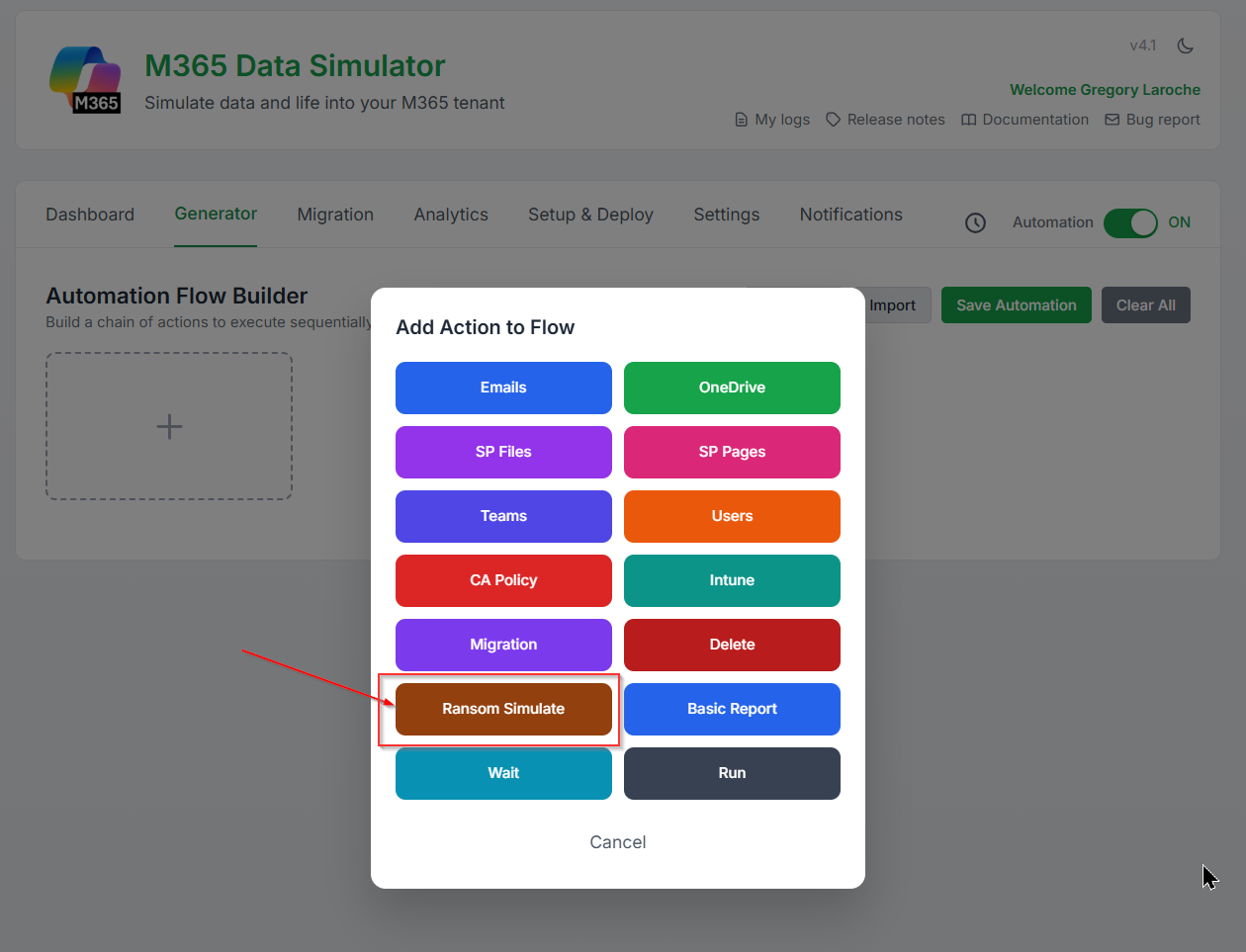
Once dropped in, here's what it'll ask for:
- Type of data: Target can be either a user's OneDrive or a SharePoint site.
- The user's name or the site name: Type it directly in the field, or hit the Entra ID button to look it up straight from your directory.
- The folder path: You can browse and pick the exact folder you want to encrypt.
- The ransomware profil: Pick your ransomware profile: WannaCry or LockBit.
- The action type: encrypt or decrypt.
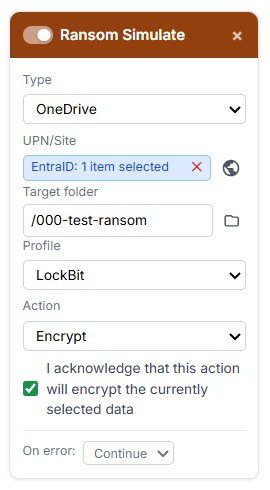
This card will do the following :
- It triggers the file behavior pattern by bulk-renaming every file in the folder with the ransomware profile's extension.
- It triggers the content behavior pattern by actually encrypting the files, which fires off a strong entropy spike, exactly what a real ransomware attack would look like.
- It triggers data exfiltration pattern by pushing a massive amount of files out to an external server (the m365simulator server in order to encrypt the files), then following up with the encrypted versions.
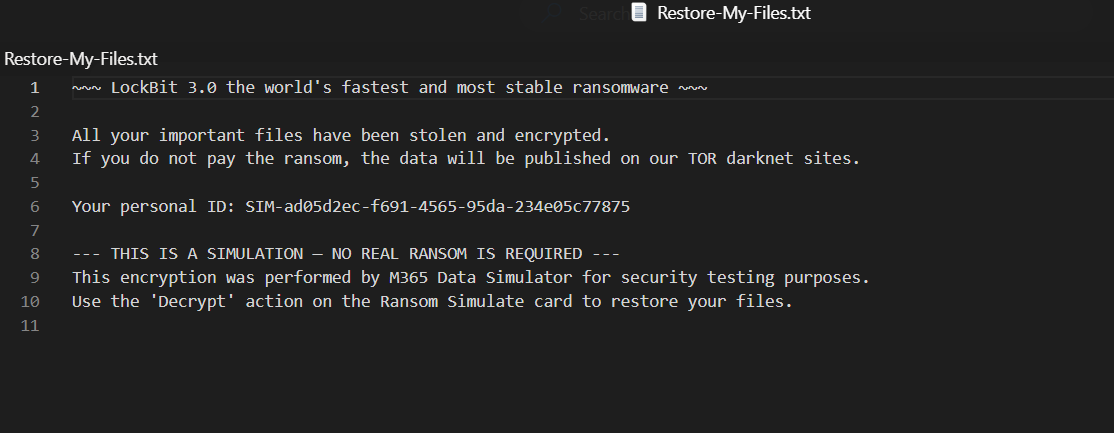
- It triggers ransomware behavior pattern by dropping a classic ransom note inside the folder (price, instructions, and all).
Wait, wait, wait... Greg, won't this actually wreck my files?!
Yes it will, and that's exactly the point, we're playing ransomware here, no half measures! 😅

But hey, relax, we've already got A plan behind the scenes.

We hold the key, and kept it safe and warm, ready to decrypt everything back. 🗝️😉
Run the encryption card and let check what's happen:
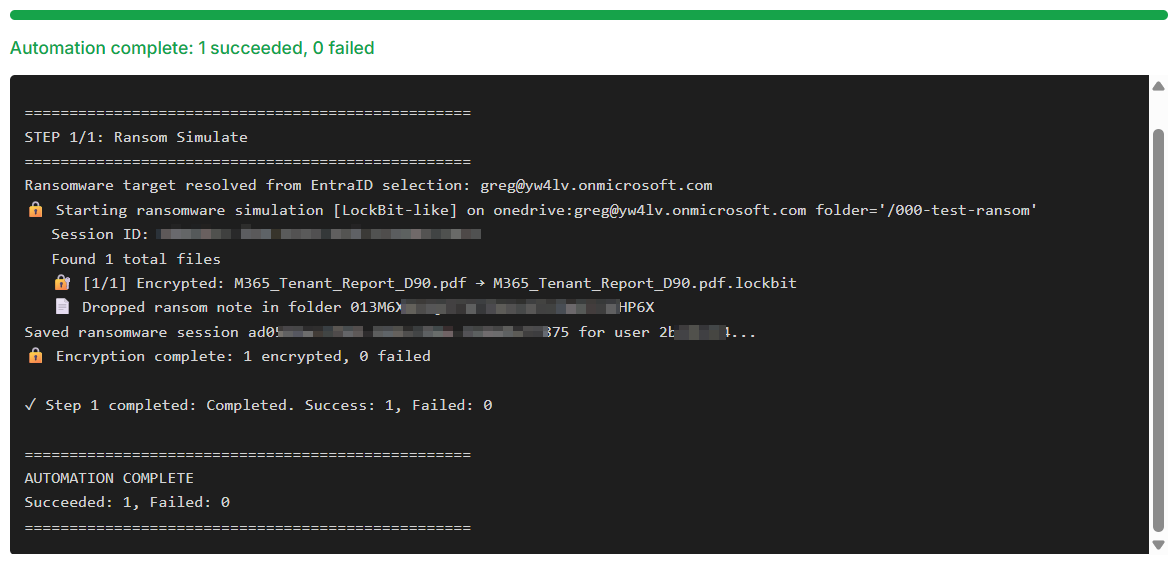
OK, done ! ✅
And sure enough, the files are encrypted:
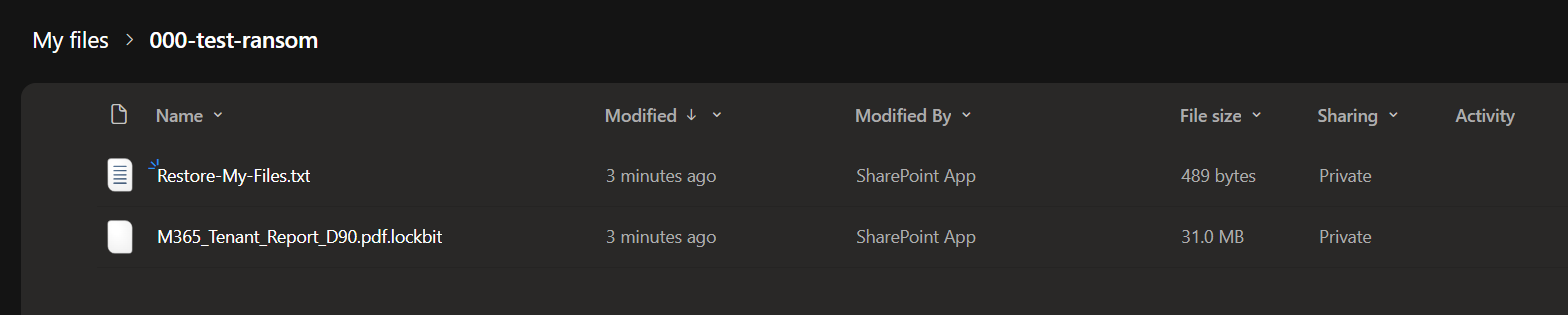
and the ransom note is in place:
Now flip back to the ransomware simulator card and switch it to decrypt:
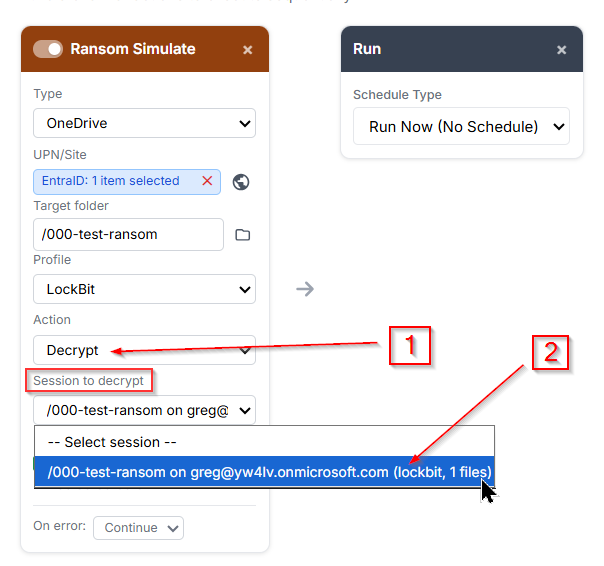
Under your session, you'll find every encryption run you've triggered so far. Any time you want, just grab the stored key and decrypt any of your simulated attacks, no data left behind!
Now let's flip the same card to decryption mode and run it:
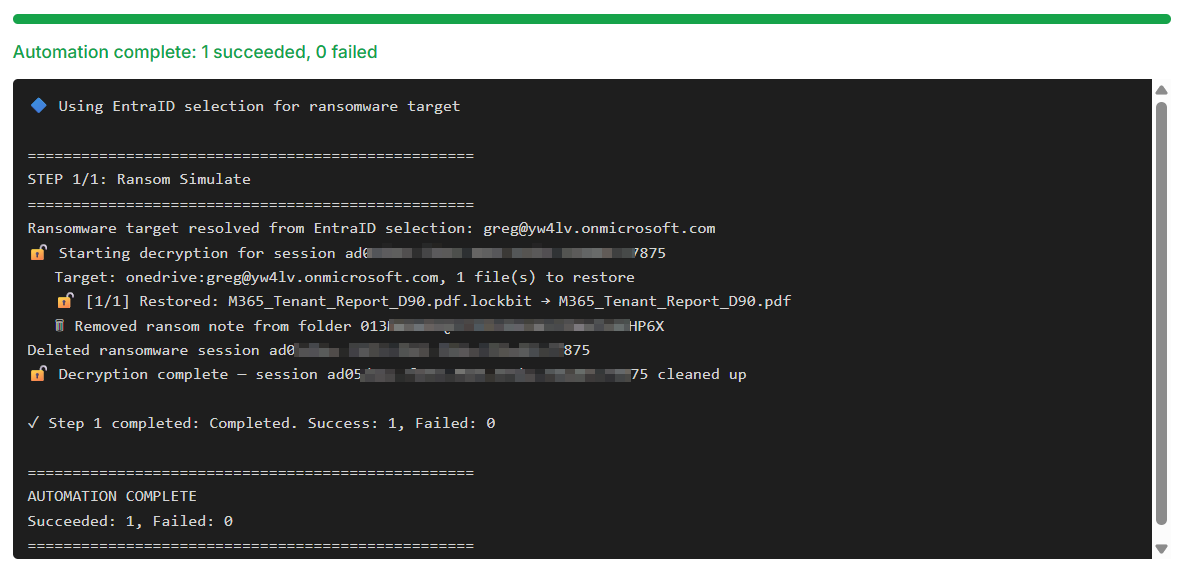
Decryption done ✅, files are back to their original, clean state:

◾ The sensitive data generator
Now that Defender's had its moment, let's put Purview to work!
The sensitive data generation engine lets you seed Microsoft 365 services with realistic, checksum-valid sensitive data, built from the ground up to trigger DLP policies.
It covers three services: Exchange Online for email bodies, OneDrive for files, and SharePoint for documents.
It's baked right into the automation flow cards too, the Email, OneDrive, and SharePoint cards each come with 3 extra fields to handle sensitive data generation.
Let's take the email cards as an example:
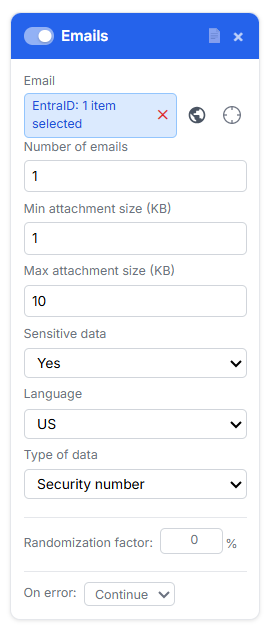
When you select "Sensitive data" -> YES, the card will query for 2 addtionnal information : Language and Type of sensitive data.
Indeed, to cover a wide range of Purview DLP triggers, sensitive data can be generated in multiple languages, with assets spanning different types of sensitive content.
Here's what's under the hood:
| Field | Values | Behavior |
|---|---|---|
| Sensitive data | No (default) / Yes | Master toggle. When No, the card behaves exactly as without this feature. |
| Language | US, FR, DE, UK, IT, ES | Controls the locale of both the sensitive data format and the document/email language. Only visible when Sensitive data is Yes. |
| Type of data | Security number, Credit card, Identification ID, Driving licence, Passport | The category of sensitive data to embed. Only visible when Sensitive data is Yes. |
But sensitive data isn't one-size-fits-all.
A Social Security number or passport number follows completely different formatting rules depending on the country it comes from, France and the US being a perfect example.
That's where things get tricky: to actually trigger DLP policies, the generated data needs to be valid and consistent with its source locale, not just look the part.
So every generated value comes with a proper checksum, ready to pass the same format checks real DLP engines run.
here is a summary:
| Language | Security Number | Credit Card | ID Card | Driving Licence | Passport |
|---|---|---|---|---|---|
| FR | NIR (Numéro de Sécurité Sociale), 13 digits + 2-digit key | Visa/MC, Luhn-valid | Carte Nationale d'Identité, 12 digits | Permis de conduire, 12 digits | 2 digits + 2 letters + 5 digits |
| DE | Rentenversicherungsnummer, 12 chars | Visa/MC, Luhn-valid | Personalausweis, 10 alphanumeric chars | Führerschein, 11 alphanumeric chars | Letter prefix + 8 alphanumeric chars |
| UK | National Insurance Number, AA 12 34 56 B | Visa/MC, Luhn-valid | (reuses NI number) | 16-char surname-based format | 9 digits |
| ES | NSS, 12 digits with modulo-97 key | Visa/MC, Luhn-valid | DNI, 8 digits + check letter | Same format as DNI | 3 letters + 6 digits |
| IT | Codice Fiscale, 16 alphanumeric chars with check letter | Visa/MC, Luhn-valid | Carta d'Identità Elettronica, CA + 5 digits + 2 letters | Patente, 2 letters + 7 digits + 1 letter | 2 letters + 7 digits |
| US | SSN, AAA-GG-SSSS | Visa/MC/Amex, Luhn-valid | (reuses SSN) | State code + 7–9 digits | Letter + 8 digits |
- Credit card numbers pass the Luhn algorithm.
- The French NIR carries the correct modulo-97 checksum key.
- The Spanish DNI includes the right control letter.
- The Italian Codice Fiscale has the proper check character.
- And every document comes bundled with a locale-appropriate identity : name, date of birth, address.
Let's fire up the email generator card with US Social Security Number content:
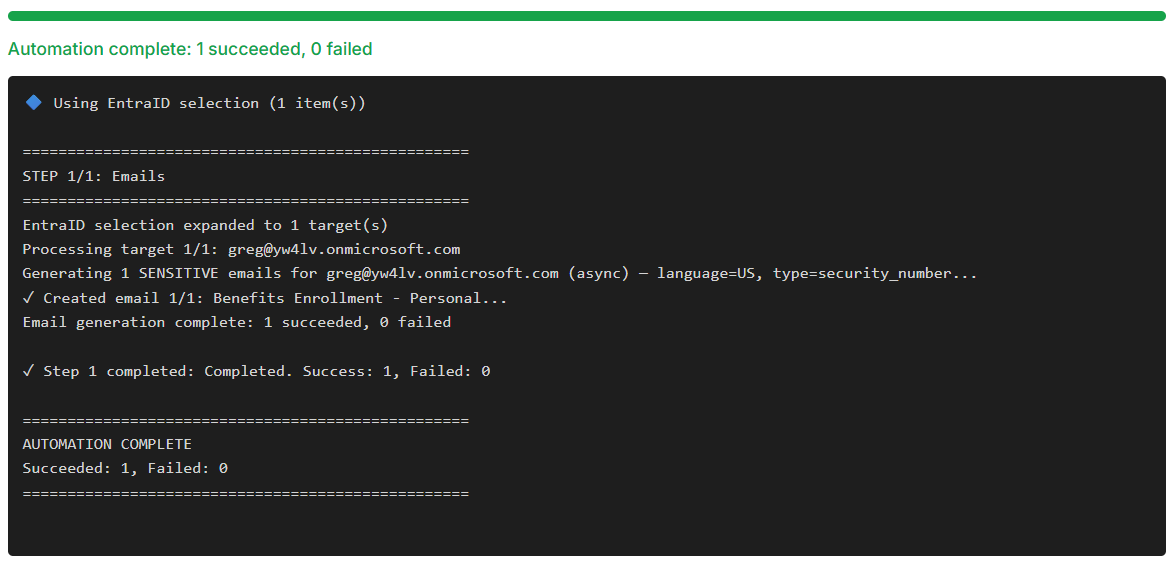
OK, done ! ✅
And here's the email that landed automatically in Greg's mailbox:
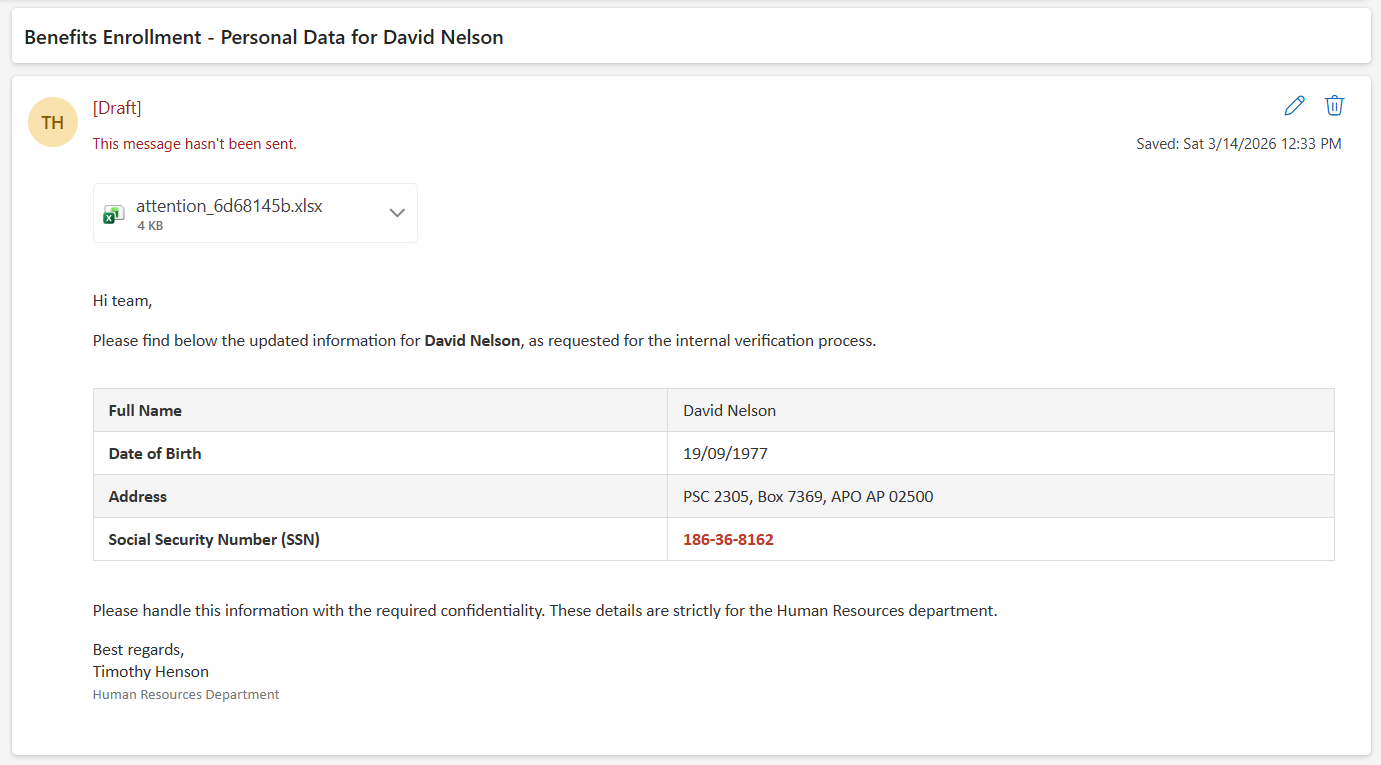
Localizaed name and address, a perfectly formatted US Social Security Number, and to top it off, it's coming straight from HR. Purview doesn't stand a chance of missing that one!
To compare, now let's just swap the language to German in the card and fire another sensitive email into Greg's mailbox:
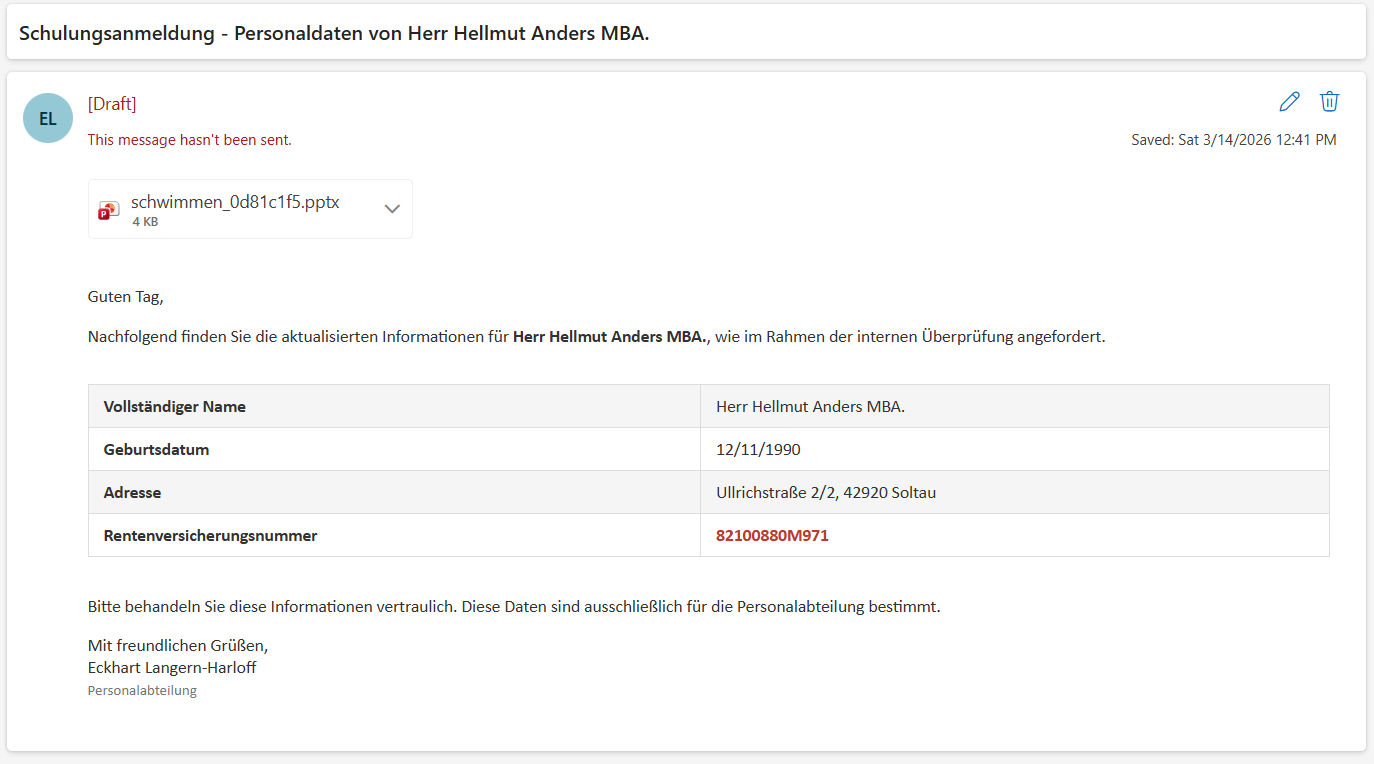
And there it is, local language, correct format, and a fully valid German Social Security Number! 👍
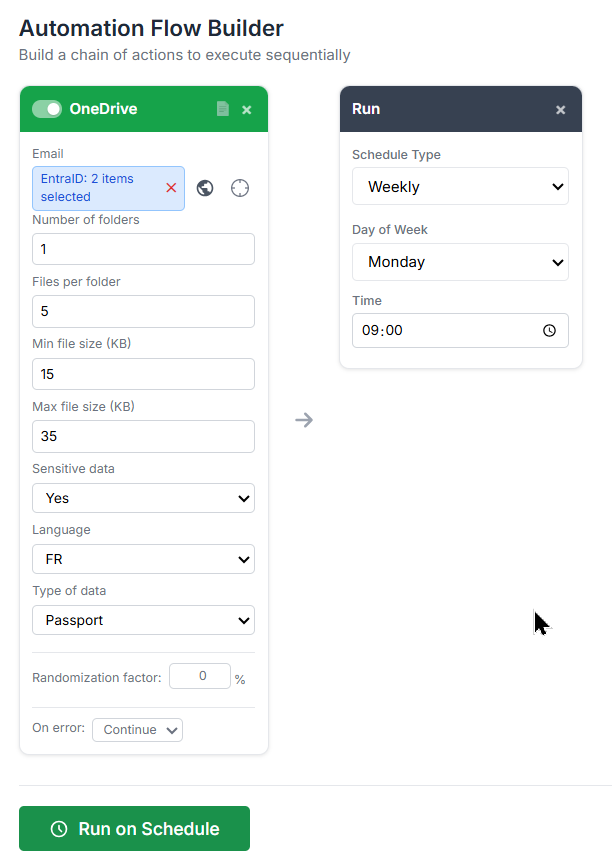
As a quick example,
let's build an automation flow that drops a fresh folder with 5 sensitive French Passport numbers straight into Greg's and Adele's OneDrive every Monday morning at 9AM:
Some use Case Examples:
Test all DLP surfaces at once: Build an automation flow with an Emails card (sensitive: FR, credit card), an OneDrive card (sensitive: FR, credit card), and an SP Files card (sensitive: FR, credit card). Run against a test user and a test SharePoint site. Your DLP solution should detect the same credit card pattern across all three services simultaneously.
Multi-locale DLP validation: Stack three Emails cards each with a different language (FR NIR, DE Rentenversicherungsnummer, UK NI number) against the same mailbox. Confirms that all your locale-specific DLP policies fire correctly in one run.
Realistic HR data leak scenario: Use an SP Files card with sensitive: US, security number, count: 3 folders, 10 files per folder. This creates 30 files (a mix of .docx, .xlsx, .pdf, .txt) scattered across a SharePoint site, simulating an accidental upload of HR export data for incident response testing.
And there you go, bulk sensitive data generation, on demand, whenever you need it.
And remember, it's just a card in the automation flow, so you can schedule the whole thing to run automatically.
Set it and forget it.
That's a wrap for this security-focused iteration of M365 Simulator!
We've covered a lot of ground, from simulating a ransomware attack cycle to generating checksum-valid sensitive data across the entire M365 stack.
As a reminder, to access to the tool, simply connect to the site below:
 M365 Data Simulator
Hope it gives you a solid playground to stress-test your Defender and Purview setups.
See you in the next one guys, and as always... Enjoy!