


The party's over folks, Microsoft is flipping the lights back on and pulling the plug on the sound system.
What happen?
As of March 1, 2026, Microsoft is tightening the throttling rules on how backup tools connect to Microsoft 365. SharePoint and OneDrive are directly in the crosshairs, with Teams data caught in the splash zone.
The trick many vendors have been leaning on for years, spinning up multiple app registrations to push through better throughput, is officially getting shut down.
Microsoft is now capping how much throughput backup tools can pull from M365 APIs, and the old trick of registering multiple Entra ID apps to bypass those limits is dead. If your backup strategy was built around that approach, expect slower performance across SharePoint, OneDrive, and Teams.
For IT admins, the move is straightforward: audit your Entra ID tenant and clean up any app registrations that have outlived their purpose.
And this isn't a one-vendor problem, every third-party backup solution talking to Microsoft Graph or the SharePoint APIs is in scope.
What have changed?
SharePoint and OneDrive have always had connection limits baked in at the app level, but here's the catch: those limits were per app. So savvy vendors just kept spinning up more apps, stacking capacity like there was no tomorrow.
Microsoft has now called time on that: one app per backup vendor, full stop. The limit is back where it always should have been. Push past those thresholds and Microsoft starts firing back HTTP 429 or 503 responses, stalling backup jobs and stretching backup windows in ways that are really awkward to explain to management. 😅
Already deployed multiple Apps and not planning to move? Don't bet on flying under the radar, Microsoft is coming for those too.
Currently, Microsoft will group similar backup activity together and throttle it as a single workload, regardless of how many app registrations sit behind it.
The workaround is done. No exceptions, no carve-outs. Every backup vendor running on M365 APIs plays by the same rules now.
But, why is Microsoft doing that to me?
Think of M365 APIs like a shared pizza: when one party keeps sneaking extra slices through registration sprawl, everyone else ends up staring at an empty box. Not cool. 🤤
Uniform enforcement puts the pizza police in charge. It brings predictability back to backup workloads at scale, gives admins a reliable baseline to actually plan around, and cranks up the pressure on vendors to build leaner, smarter integrations.
No more freeloading at the API buffet.

What are the new challenges?
For most organizations, this change will be a total non-event. Standard setups running through a single app registration won't even blink, backups keep humming along as usual. 👍
The pain lands squarely on environments that were deliberately engineered to game the system by stacking multiple registrations.
Once unified throttling kicks in, that house of cards collapses fast. And you'll feel it:
- Backup jobs slow down and start missing their windows
- Incremental syncs fall behind and never quite catch up
- RPOs start slipping in ways that are hard to justify
And there's another sting in the tail for organizations sitting on large data volumes. Full backups were already the heaviest lift in terms of API quotas, now they have to run within tighter boundaries with no turbo boost available.
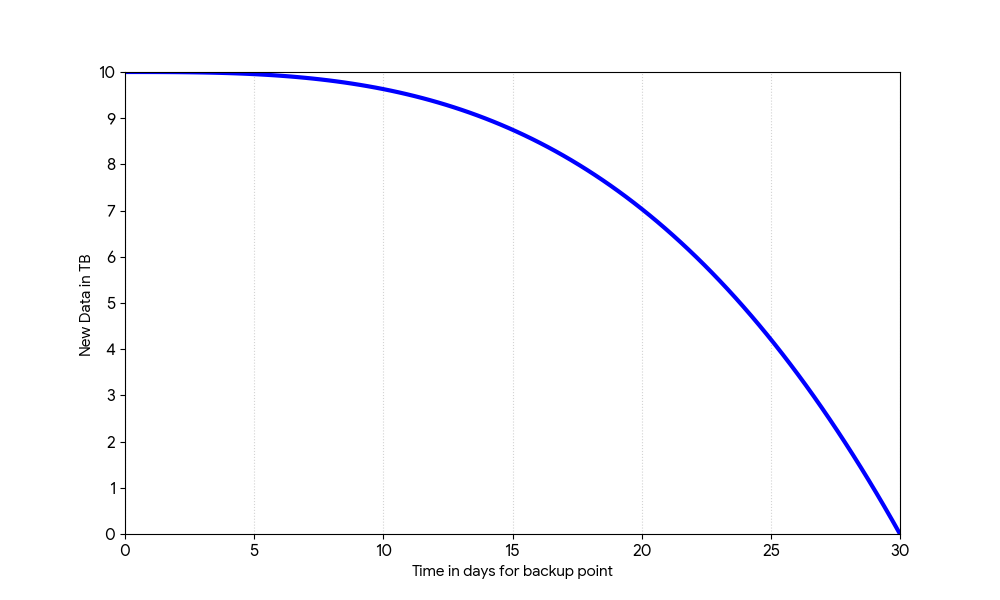
For tenants carrying hundred terabytes of SharePoint or OneDrive content, that first complete backup could stretch from weeks into several months or even years! and with zero ability to speed things up by throwing more registrations at it.
And here's where it gets really spicy: while that painfully slow first full backup is still grinding away, life doesn't stop, SharePoint and OneDrive keep changing.
So when the first incremental finally kicks in, it's not just carrying one day of changes, it's carrying everything that piled up while the full was running. That incremental gets heavier, takes longer, and by the time the next one rolls around, same story continue.
So don't think of this as a one-time headache that ends when the first full backup wraps up. This is a slow-burn onboarding cycle, the bigger the tenant, the longer it takes to reach full protection.
Wait, but what about the new SharePoint Prioritization service? isn't that supposed to help?
Well, well, well... here's the cherry on top: this is a metered endpoint, and just glancing at the price tag might be enough to make a lot of organizations slam the brakes.
Let's be crystal clear: we're talking $0.50 per 1,000 API calls. 😓💸
Now factor in a SharePoint site holding thousands, sometimes millions of files, which translates into multi-million Microsoft Graph API calls just to back them up...
Yeah, your finance team is not going to love this conversation. Buckle up.
👉 Check Microsoft documentation about SharePoint Prioritization service here for more the details.
So, what's the solution?
For heavyweight M365 tenants with massive SharePoint and OneDrive estates, relying solely on the Microsoft Graph API to get protected in any reasonable timeframe is starting to look like a losing bet.
Waiting months, or even years, for that first full backup to land isn't something most organizations will sign up for with a smile.
The good news?
Enter MBS (Microsoft Backup Storage), the Graph API's turbo-charged cousin when it comes to protecting M365 tenants.
No throttling, lightning-fast performance, and yes, a few trade-offs to keep in mind too :
- 1 year retention at max
- no Teams protection (currently, but it has been planned by MS)
- and data is living nearby M365 data
Yes, but hey, the performances are absolutly massive !
Bottom line: MBS can get your big SharePoint or OneDrive estate backed up in hours rather than weeks/months. That's not a small difference, that's a whole different league.
Want to go deeper on MBS? Rather than re-explaining everything below, let's check out my article on how to use MBS with M365 - Rapid SharePoint recovery strategies : minimal downtime.
 Grégory Laroche
That's a wrap on this quick dive into what's shaking up the M365 backup world right now.
Hope you enjoyed it, fellow tech nerds, catch you on the next one!