


Ola, Ola, Ladies and Gentlemen! M365simulator 4.7 is officially LIVE with a fresh batch of new tools, shiny new features, and even more simulation power than ever before!
In a quick summary, here’s what’s new in this release:
- Create fake devices in your Entra ID
- Added "Mixed" sensitive data generation across Mail, OneDrive, and SharePoint
- Create OneDrive & SharePoint files with versioning support
- Added support for AI model of your choice in Settings
- Generate full email conversation threads using an AI model of your choice
- Lucien AI ChatBot can answer all your questions!
- New "Security Audit (AI)" report now available
- New "M365 Throttling Audit" available to detect tenant throttling levels
- Multi-tenant support added!
- New dashboard cards added to track key metrics
- Added a new card to the Tenant Basic Report for Entra ID metrics
- The generator can now create Organizational Contacts in Entra ID
1/ Create fake device in your EntraID 🗒️
Coming with release v4.7: meet the brand new Fake Device Generator!
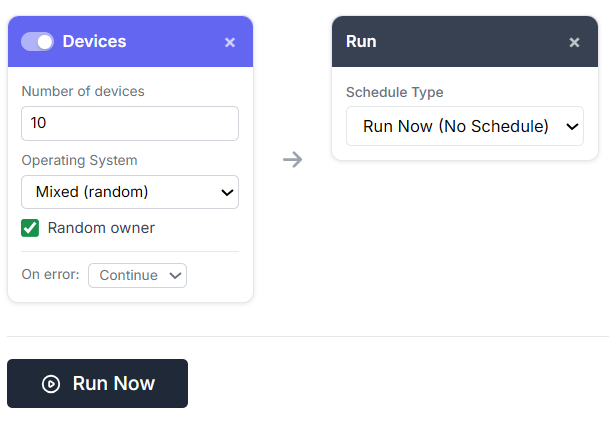
Need a tenant that looks less empty and more like real life? The new Devices Card lets you instantly populate Microsoft Entra ID with up to 100 fake devices across Windows, macOS, iOS, Android, or go full chaos with Mixed mode for automatic OS randomization.
Each generated device is automatically linked to a random user to create a more realistic device inventory and make enrollment, inventory, and policy evaluation scenarios feel much closer to the real world.
Just use the new "Devices" card from the advanced generator console:
2/ Mixed sensitive data generation categories 🗒️
Across Mail, OneDrive, and SharePoint, you could already generate content containing sensitive data (see the dedicated DLP generation blog post for the full details).
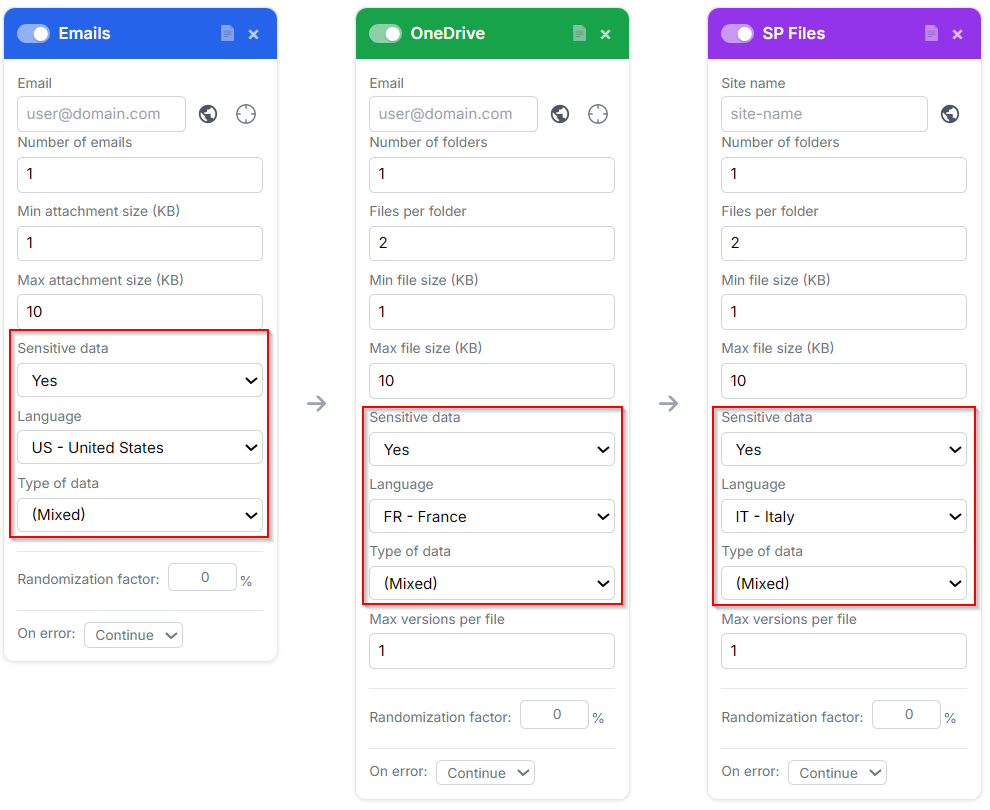
This release adds a new twist: sensitive data categories can now be randomized automatically inside generated documents and attachments.
Generated files remain real Office documents such as "docx" and "xlsx", but now each one can contain a different type of sensitive content such as Social Security numbers, credit cards, national IDs, driver’s licenses, or passport data.
So your demo tenant starts looking suspiciously real! 😀
3/ OneDrive and SharePoint versioning support 🗒️
Most files stored in SharePoint, and even more in OneDrive, do not live as a single version. Teams collaborate, edit, save, re-edit… and quickly generate long version histories.
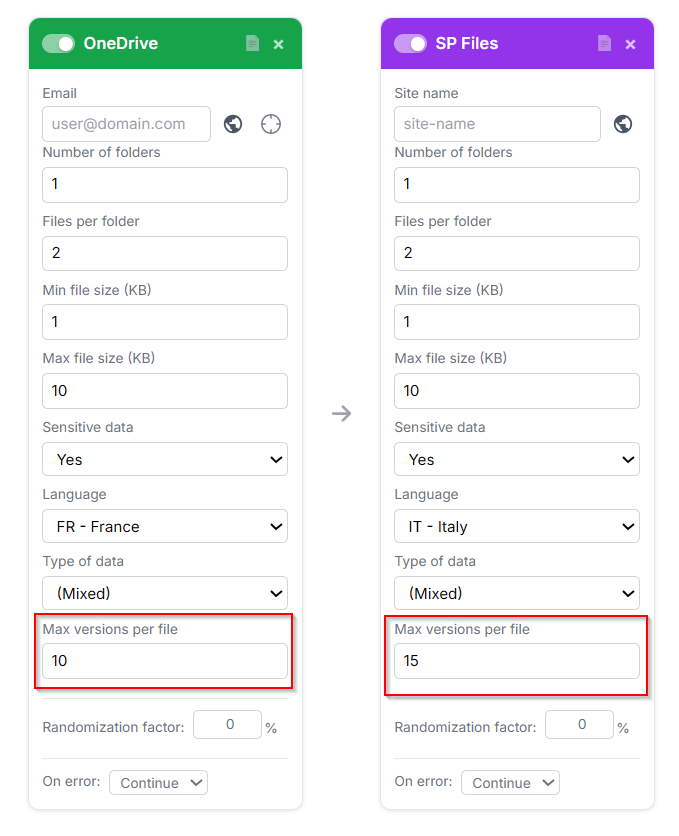
So if you want to properly test your backup solution, testing files alone is not enough, you also need realistic versioning.
Good news: with v4.7, the updated file generator can now automatically create document versions, making your test tenants feel a lot closer to real-world usage.
4/ Support of the AI model of your choice 🗒️
It’s 2026, what would any solution be without a little AI? 😉
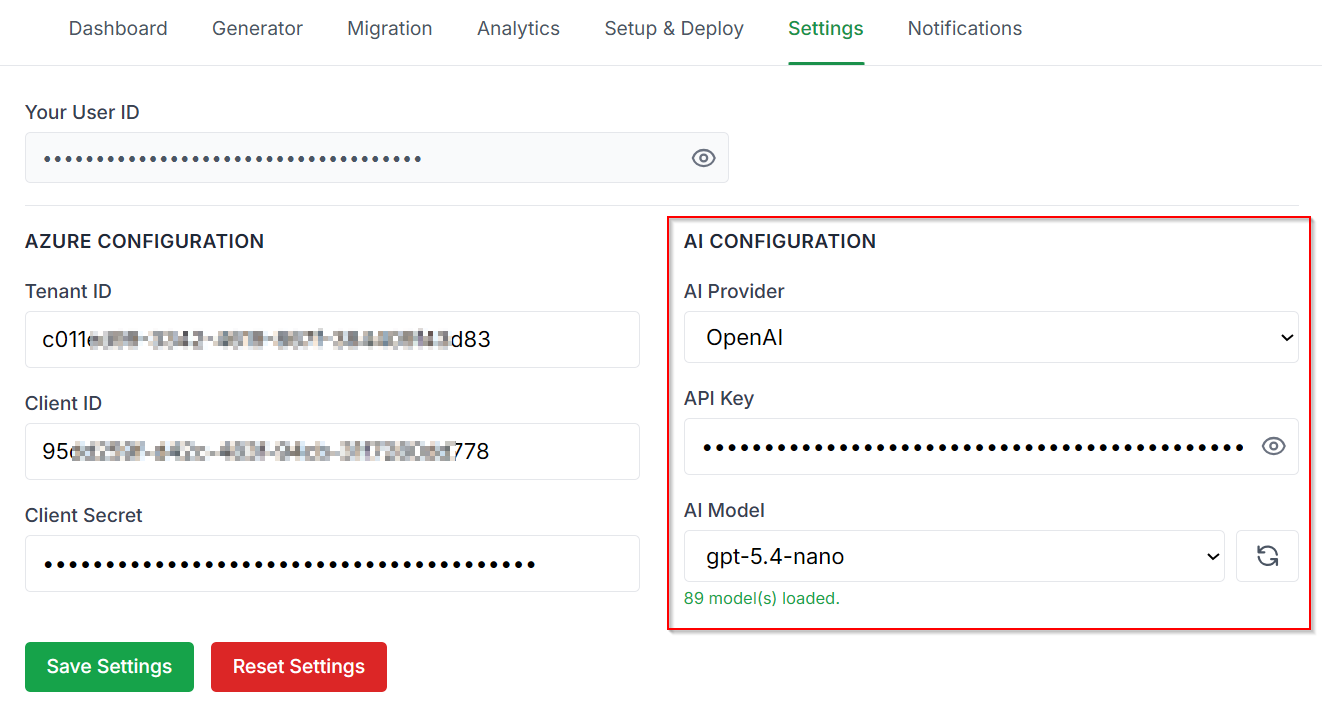
With v4.7, M365simulator gets trendier with new AI-powered features. Choose your favorite brain between OpenAI and Anthropic models, plug it in, and let the simulator bring a smarter touch to your Microsoft 365 scenarios.
It happen in the settings :
➡ AI feature: full email conversation threads 🗒️
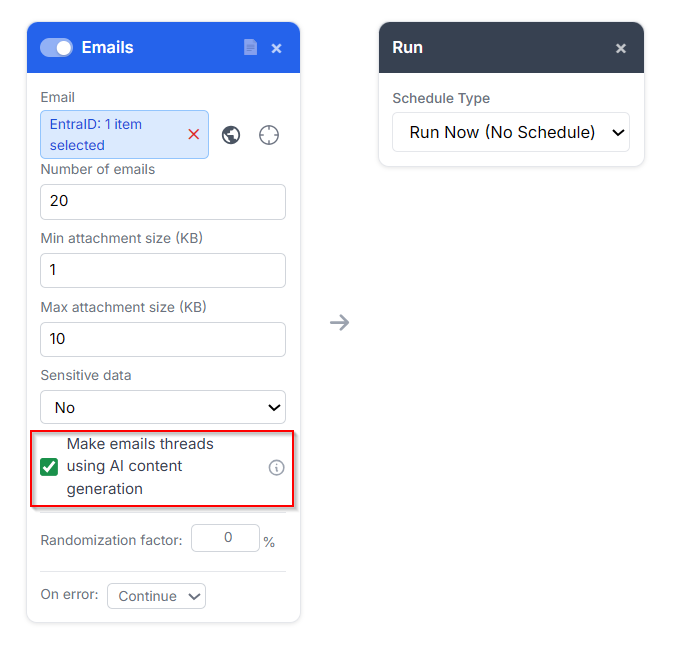
Until now, the email generator created standalone messages with no real connection between them. But real life is messier than that, emails live in threads, with people replying, reacting, looping others in, and occasionally creating a 20-message conversation out of one simple topic.
With v4.7, AI can now generate credible email threads by creating participants, subjects, and message bodies that logically follow each other. Pick a random topic, let your virtual buddies jump in, and watch the conversation build itself automatically.
Want to drop a 20-email discussion between your virtual team?
It’s as simple as that:
🚨Update from v4.8 is already here!
The new release introduces a dashboard widget dedicated to AI-generated email threads. You can now visually explore conversations, follow participant interactions, and replay how discussions evolved over time in a much more fun and animated way.
See it live below :
Replay to watch the conversation unfold like a tiny corporate drama!
it also generated email thread with realistic assets :
✅ Builds realistic back-and-forth email threads AI-generated
✅ Picks eligible real user mailboxes from your tenant
✅ Varies who replies and when, just like real life
✅ Writes messages based on each participant’s job role
✅ Keeps timestamps aligned across mailboxes
✅ Adds Outlook-style quoted reply chains
✅ Includes realistic signatures with names and job titles
➡ AI feature: Lucien! The AI ChatBot! 🗒️
Need help while building your perfect Microsoft 365 chaos? Meet Lucien 🤖, your new built-in AI sidekick!
Accessible directly from the dashboard header, Lucien is the AI assistant for M365 Data Simulator. No more switching tabs, searching documentation, or trying to remember where that one setting lives.
Powered by your own AI provider (OpenAI or Anthropic), Lucien has knowledge of the full M365 Data Simulator documentation and can answer questions about features, configuration, workflows, troubleshooting, best practices, and usage scenarios. Ask about Generators, Automation Flow, Scheduling, Analytics, MCP, or simply ask “how do I do this?” and let Lucien guide you.
Responses stream live and Lucien speaks the same language as you, et oui !
➡ AI feature: the new Security Audit report 🗒️
Security dashboards are cool, but Security dashboards that explain themselves are cooler! 😎
Meet the new Security Audit, available directly from the Analytics tab.
Instead of digging through endless settings and dashboards, launch a scan and get a fast, readable overview of your tenant’s security posture in just a few clicks.
So now, you know! 😉
The audit analyzes nine major security areas including: Authentication, Identity Protection, Conditional Access, Configuration, Threat Detection, Email Security, Defender for O365, Privileged Access, and Data Governance.
Findings are transformed into clear statuses, risk indicators, and an overall score so you can immediately spot where attention is needed.
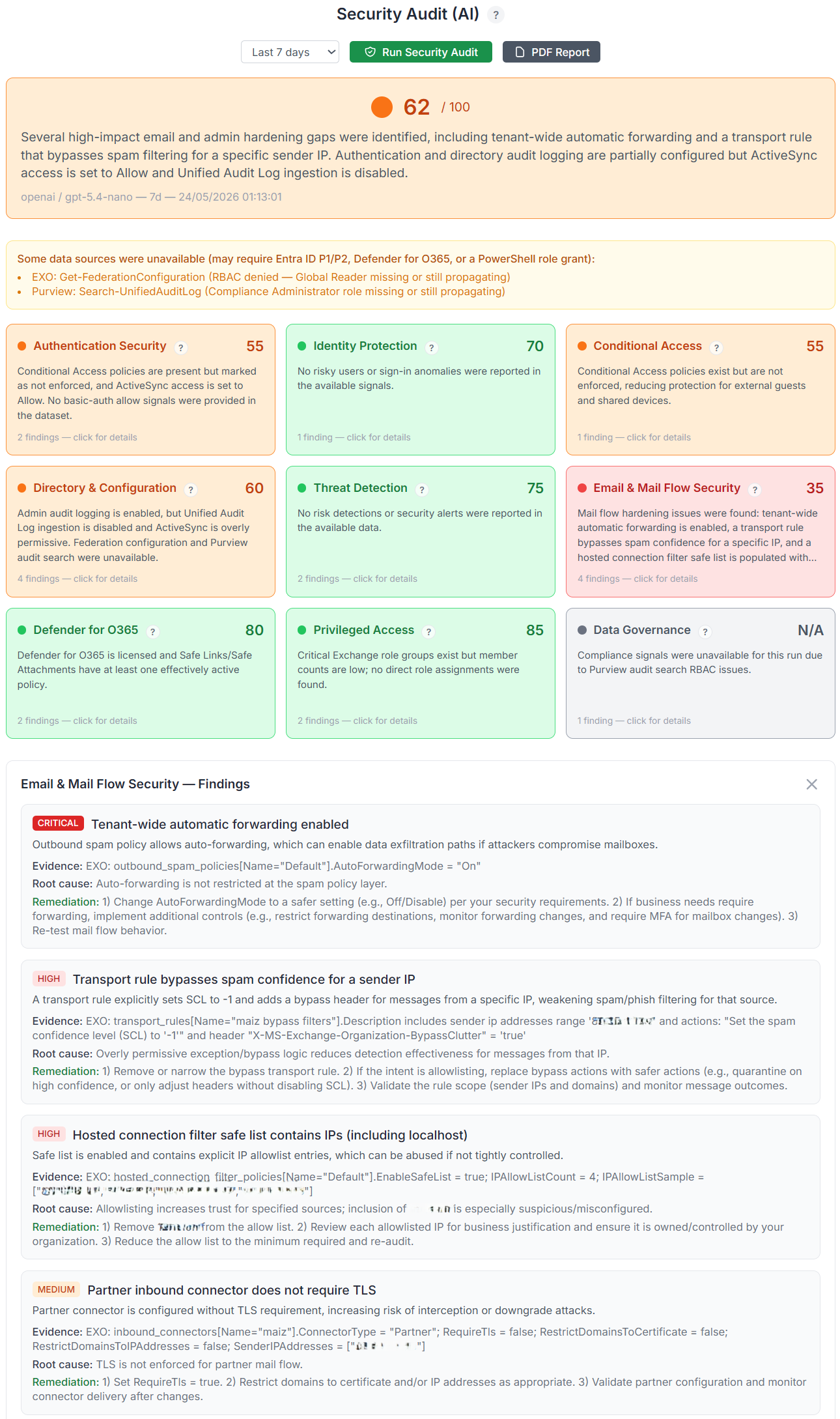
Need to share the results? Export everything into a PDF report and pretend you spent the entire morning manually reviewing your tenant! 😁😜
5/ New "M365 Throttling Audit" 🗒️
Ever wondered if your tenant is being throttled… or if Microsoft is just having one of those days? Meet the new M365 Throttling Audit, your tenant’s personal stress detector!
Instead of guessing whether performance drops are coming from Microsoft Graph limits, service degradation, network hiccups, or simple bad timing, the audit actively probes Graph endpoints and tracks what really happened.
Run a quick check or schedule automated audits over time, then watch your tenant’s behavior through a rolling 30-day history. Follow latency trends, spot HTTP 429 throttling events, identify 503 degradations, and correlate spikes with backup jobs, tenant activity, or busy hours.
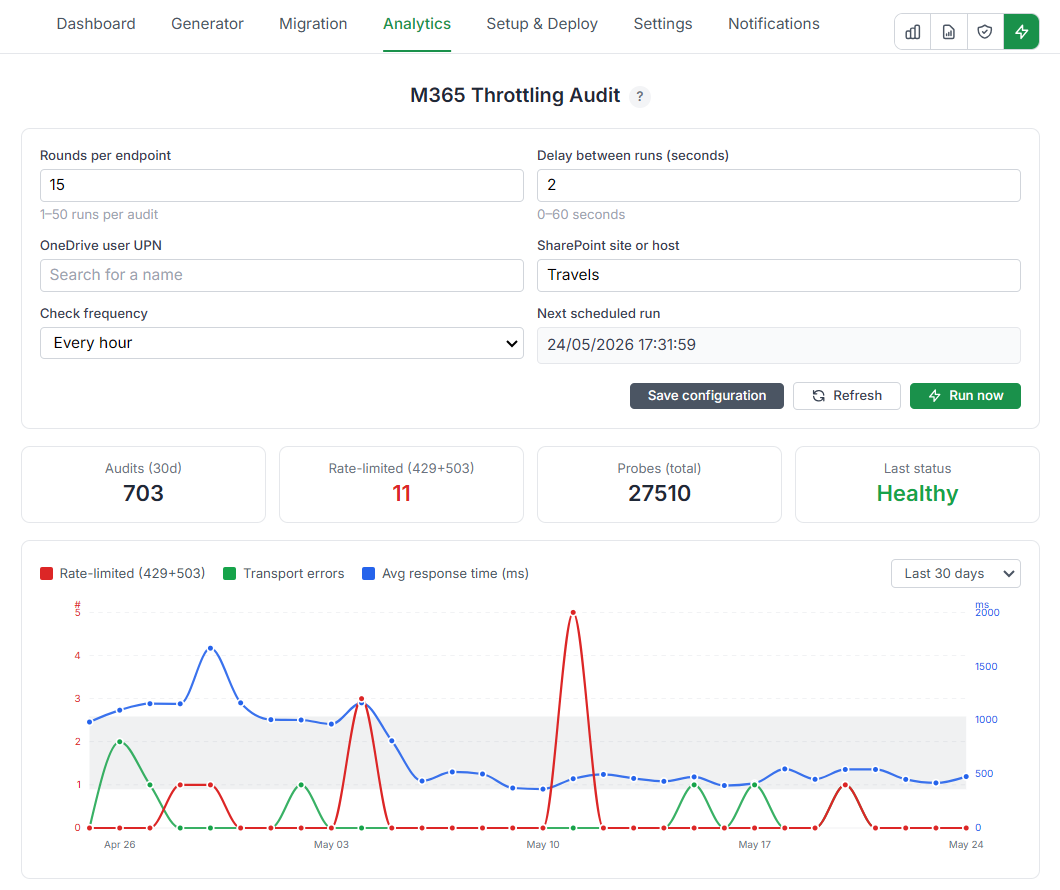
And because we all secretly love dashboards, results are displayed through live execution logs, KPI cards, interactive graphs, historical drill-downs, retry indicators, throttle scope detection, and service health context.
Click any point in history and inspect every individual probe like a true Microsoft 365 detective.
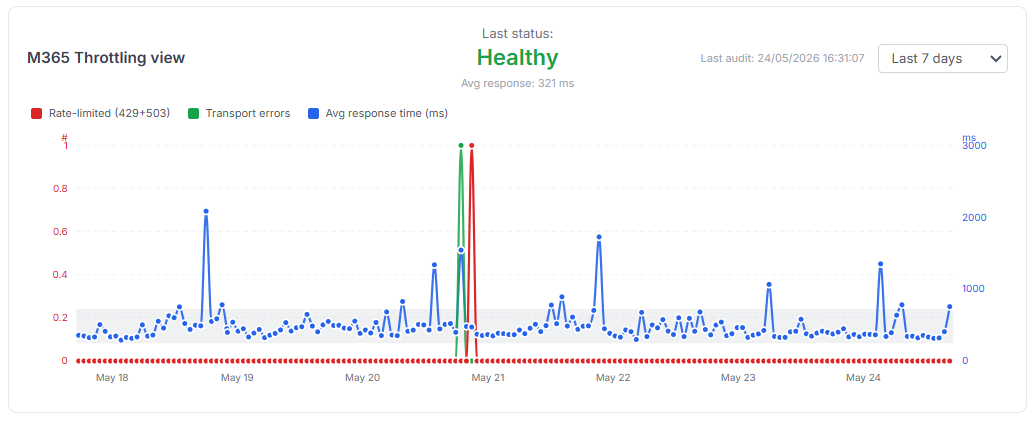
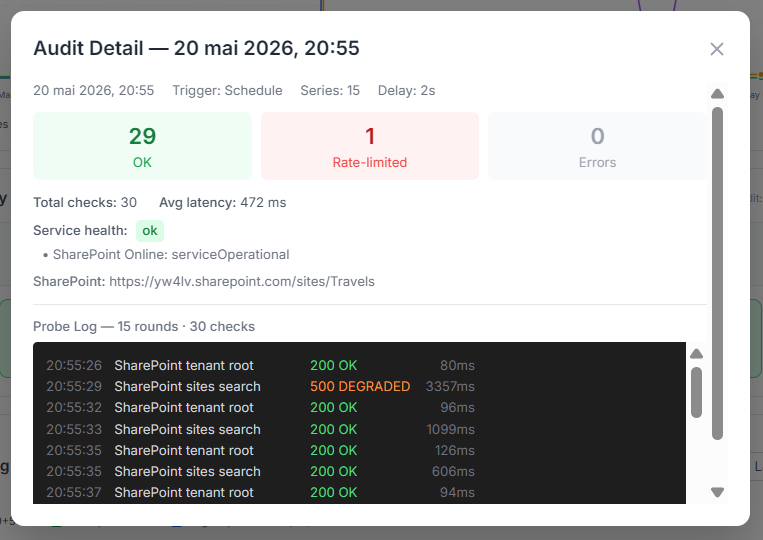
Bonus point: when Microsoft says “slow down” with a 429… we actually listen. No retries here, because throttling is the signal, not the bug.
6/ Multi-tenant support added! 🗒️
One browser, multiple tenants, zero tab chaos.
Until now, managing several Microsoft 365 environments often meant juggling Backup/Restore, opening private windows, or becoming that person with five browsers open at once.
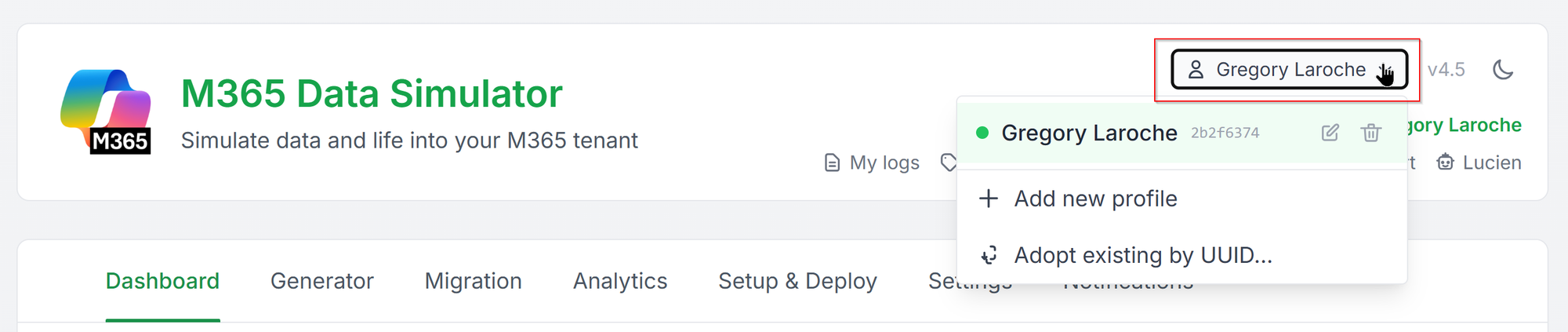
With v4.7, M365 Data Simulator introduces Multi-Profile support. You can now manage multiple completely isolated profiles directly from the same browser and switch between them in a single click. Settings, credentials, jobs, logs, and configurations stay fully separated, so every profile behaves like its own independent workspace.
Create a brand-new profile, adopt an existing one by UUID, rename them to keep things organized, or hide profiles you’re not actively using. And because scheduled jobs live server-side, your automations keep running even while you jump between environments.
Need five tenants open? No problem. Need twenty? We won’t judge! 😉
7/ New dashboard cards to track key metrics 🗒️
A dashboard should do more than display numbers, it should make your tenant feel alive.
This release introduces a new set of KPI cards designed to surface the signals that actually matter. Instantly see how many items were generated today, how many jobs executed, which schedules are active, and whether anything went sideways overnight. Every metric includes day-over-day comparison to make changes stand out naturally.
Some cards appear dynamically depending on what features you use :
- Enable scheduled M365 Throttling Audits and a new Avg Graph Latency card unlocks automatically, giving you visibility into Microsoft Graph responsiveness with trend indicators and a lightweight 24-hour timeline.
- Tracking tenant growth? The new Combined Storage card follows the evolution of your total SharePoint, OneDrive, and Exchange footprint over time so you can see your generated environment expanding point after point.

Less digging through reports, more understanding what your tenant is trying to tell you.
8/ the "Tenant Basic Report" updated with Entra ID metrics 🗒️
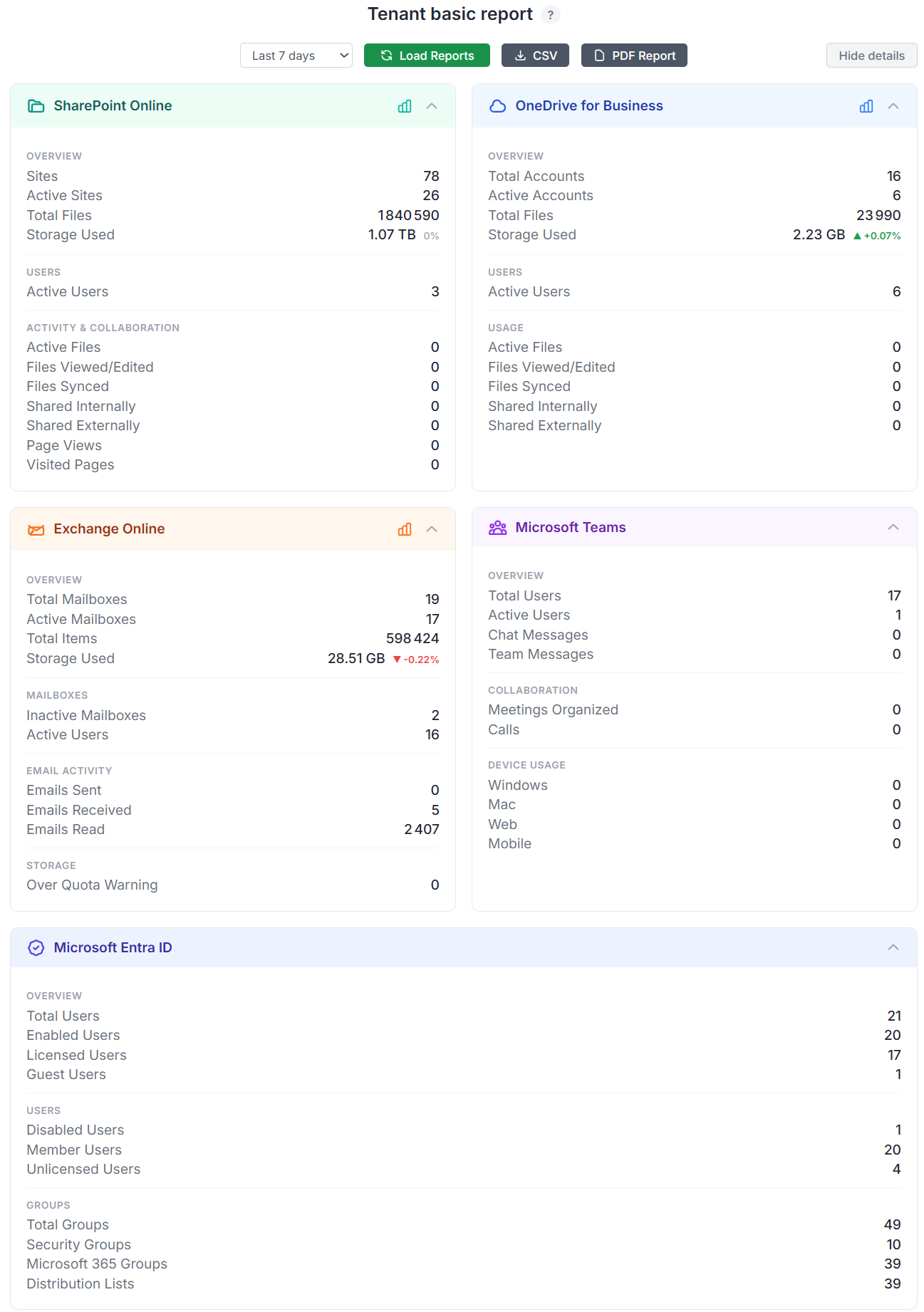
The Tenant Basic Report just gained a new perspective: Microsoft Entra ID.
Until now, the dashboard focused on workloads. With v4.7, identity finally joins the party with a brand-new Entra ID analytics card giving you an instant snapshot of your tenant directory.
Track key identity metrics at a glance including total users, enabled accounts, licensed users, and guest users. Need more details? Expand the card to reveal additional breakdowns such as disabled accounts, member vs guest distribution, licensing coverage, and group statistics including Security Groups, Microsoft 365 Groups, and Distribution Lists.
Your identity metrics finally have their own VIP seat on the basic report dashboard!
9/ new generator to create "Organizational Contacts" 🗒️
A company directory with only internal users feels a little… lonely. 😥
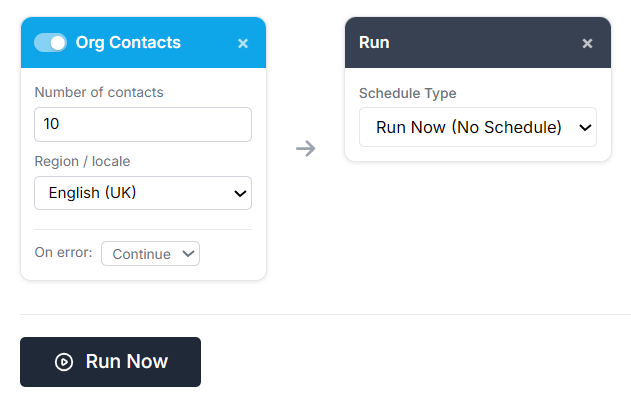
With v4.7, a new generator can now create realistic Organizational Contacts directly in Exchange Online and automatically populate your Global Address List (GAL).
Generate up to 50 external contacts with localized names, job titles, companies, phone numbers, and email addresses across multiple regions and languages for me realist assets. Need French partners? Japanese suppliers? International vendors? A few clicks and your tenant suddenly looks like a company that actually talks to the outside world.
Perfect for demos, testing, and making Outlook contacts feel less socially isolated!😊

Want all the details and ready to go full geek mode? Dive into the complete M365simulator technical documentation and explore every feature!
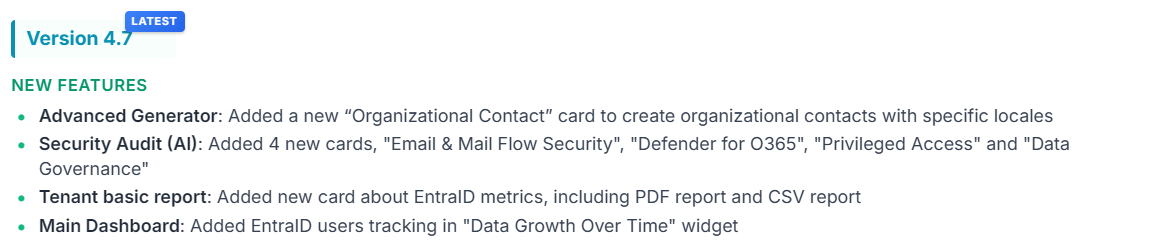
Keep an eye on our refreshed Release Notes and follow the evolution of M365simulator release after release
Et voilà, my dear M365 aficionados, v4.7 is now officially live on the server, crafted with love just for you and probably a questionable amount of coffee!
Enjoy it, bring life to your M365 tenant, generate some chaos, simulate like there’s no tomorrow, and have fun exploring everything this new release has to offer!
Got a crazy idea? A feature that would make M365simulator even cooler? Found a bug hiding somewhere? Or simply want to say hello?
I’m always happy to chat! Just hit the "Bug report" button and send me a message!