


New improvements keep arriving piece by piece, update after update, and I think the basket is finally full enough to share a quick summary of what’s new in M365Simulator.
And the timing is perfect, because M365Simulator v5.1 is now out!
So, let’s have a look at the latest goodies added since the previous version, and see what this new release brings to the lab.
Ok, ok, OK! Enough teasing, guys! What’s new in v5.1?
Quick summary:
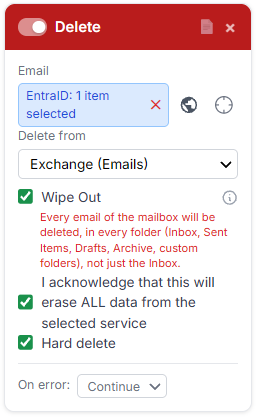
- Deletion card: now a "Wipe Out" option available
- Public API: A full set of API is now available
- Sensitive data creation: New models available (PII, PCI, PHI, IP, Legal, Crypto, Code, Online identifiers, Biometrics, etc)
- Backend: New progressive throttling management engine
- Intune: updating Intune card to get full Intune RBAC management
1/ New wipe out feature in the deletion card
Sometimes, you don’t want to delete some test data.
You just want to wipe everything and start fresh.
Since v4.9, the Delete card could already clean up data from services such as Exchange, OneDrive, SharePoint, calendars, contacts, and Business Units.
For a normal cleanup, you choose how many items you want to remove, whether M365Simulator should start with the oldest or newest ones, and whether you want a soft delete or a hard delete.
That works perfectly when you only want to remove part of the generated data. But if your goal is to completely clean a mailbox or a drive, specifying thousands of items is not exactly the most elegant way to spend your afternoon. 😄
That’s where the new Wipe Out option comes in!
Enable it, and M365Simulator completely cleans the selected service for the target. For example:
- all emails and mailbox folders from Exchange
- all files from OneDrive
- all calendar events
- all personal contacts
The cleanup process is also optimized for this use case, resulting in fewer API calls compared with deleting large amounts of content item by item.
In short: regular cleanup when you want a little housekeeping, Wipe Out when you want the big broom. 🧹
2/ Public API: A full set of API is now available
M365Simulator could already be controlled externally through MCP, opening the door to AI assistants and other MCP-compatible tools.
Now there’s a second way in: the new Public API.
With it, you can control M365Simulator directly from your own scripts, CI/CD pipelines, scheduled jobs, or external applications, without touching the web interface. The nice part is that the API uses the same cards and settings as the advanced generator, so everything behaves the same whether you launch a job from the UI, through MCP, or through the API. 👍😎
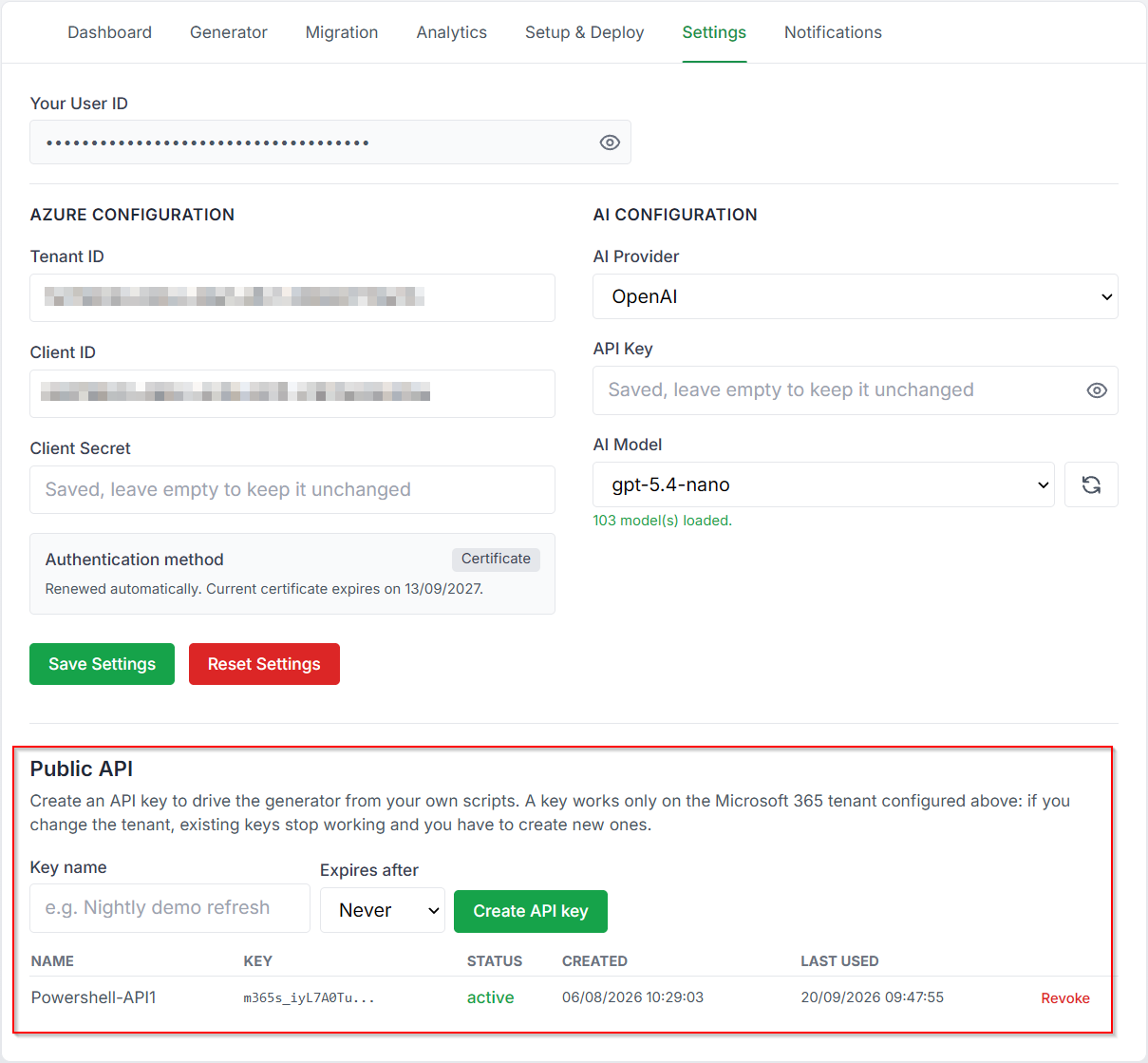
To get started, simply create an API key from the Settings page.
Each key is linked to the Microsoft 365 tenant it was created for.
Once a job is running, you can follow its progress, check the result of each card, read the logs, and even cancel the job if things start going sideways! 😅
So now you can pick the tool that fits the job:
MCP for AI-driven interaction, Public API for classic automation and integration workflows.
Let me share a code example below:
This is Python script that would run a flow and report the result.
import time
from datetime import datetime
import requests

BASE = "https://www.m365simulator.com/api/public/v1"
HEADERS = {"Authorization": "Bearer YOUR_API_KEY"}
TENANT_ID = "YOUR_TENANT_ID"
TERMINAL = {"completed", "failed", "cancelled"}

def start_run():
    body = {"tenant_id": TENANT_ID, "name": "Demo mailbox refresh",
            "cards": [{"action": "mail", "target": "demo.user@contoso.com", "count": 25}]}
    resp = requests.post(f"{BASE}/runs", json=body, headers=HEADERS)
    resp.raise_for_status()
    return resp.json()["run_id"]

def wait_for_run(run_id):
    while True:
        resp = requests.get(f"{BASE}/runs/{run_id}", headers=HEADERS)
        resp.raise_for_status()
        run = resp.json()
        progress = run.get("progress")
        if progress:
            print(f"  {progress['card']}: {progress['done']}/{progress['total']}")
        if run["status"] in TERMINAL:
            return run
        time.sleep(5)

def summarise(run):
    started, finished = run.get("started_at"), run.get("finished_at")
    if started and finished:
        seconds = (datetime.fromisoformat(finished) - datetime.fromisoformat(started)).total_seconds()
        duration = f"{int(seconds // 60)}m {int(seconds % 60)}s" if seconds >= 60 else f"{seconds:.0f}s"
    else:
        duration = "unknown"

    summary = run.get("summary", {})
    print("\n" + "-" * 60)
    print(f"Run      : {run['name']}")
    print(f"Status   : {run['status']}")
    print(f"Tenant   : {run['tenant_id']}")
    print(f"Duration : {duration}")
    print(f"Totals   : {summary.get('cards_completed', 0)}/{summary.get('cards_run', 0)} cards, "
          f"{summary.get('items_processed', 0)} items")
    print("Results  :")
    for item in run.get("results", []):
        where = f" -> {item['target']}" if item.get("target") else ""
        print(f"  [{item['status']:<9}] {item['card']}{where}: {item['done']}/{item['total']}")
        if item.get("created_upns"):
            print(f"              created: {', '.join(item['created_upns'][:5])}")
    print("-" * 60)
    return summary.get("cards_failed", 0) == 0

run_id = start_run()
print(f"Run {run_id} queued")
if not summarise(wait_for_run(run_id)):
    raise SystemExit(1)      # non-zero exit so a pipeline notices the failure
More code example from our documentation here.
Same M365Simulator engine, just more ways to press the buttons without actually pressing the buttons! 😆
3/ New sensitive data creation profiles
The Sensitive Data Generation engine just got a pretty massive upgrade.
M365Simulator can now generate much richer sensitive content across Exchange, OneDrive, and SharePoint, using 9 different data families such as:
- Personal identity
- Financial
- Health
- Legal
- Intellectual property
- Source code
- Online identifiers
- Crypto-assets
- Biometric data.
The generated content is not just random text dropped into a file. It comes as realistic documents in many different formats, depending on the selected data family.
Here’s a quick view of what can be generated:
| Data family | Data types | File types |
|---|---|---|
| Personal identity | HR records with national IDs, credit cards, ID cards, driving licences, passports | .docx, .xlsx, .pdf, .txt |
| Financial | Bank statements, invoices, payroll registers, wire transfers | .xlsx, .pdf, .csv, .docx, .txt |
| Health and medical | Patient records, lab results, prescriptions, insurance claims | .docx, .pdf, .xlsx, .csv, .json, .hl7 |
| Legal | Service agreements, NDAs, litigation memos, powers of attorney | .docx, .pdf, .txt |
| Intellectual property | Patent drafts, invention disclosures, trade secrets, product roadmaps | .docx, .pdf, .xlsx, .pptx |
| Source code | Python, TypeScript, Java, C#, Go, SQL, PowerShell, Bash, Terraform, configuration files | .py, .ts, .java, .cs, .go, .sql, .ps1, .sh, .tf, .env, .yaml, .json |
| Online identifiers | Access logs, device inventories, account exports, tracking data, access requests | .log, .csv, .jsonl, .xlsx, .json, .har, .docx, .pdf |
| Crypto-assets | Exchange statements, wallet exports, tax reports, KYC records | .xlsx, .pdf, .csv, .json, .docx |
| Biometric data | Fingerprint records, face verification logs, consent forms, voiceprints, call recordings | .csv, .xlsx, .json, .log, .jsonl, .docx, .pdf, .jpg, .png, .xml, .mp3 |
You can also choose the language, the type of sensitive data, and even the percentage of generated items that should contain sensitive information, so you don’t have to turn your whole tenant into a giant DLP alarm factory.
And of course, the feature remains completely optional. If you don’t enable it, M365Simulator keeps generating its usual random content as before.
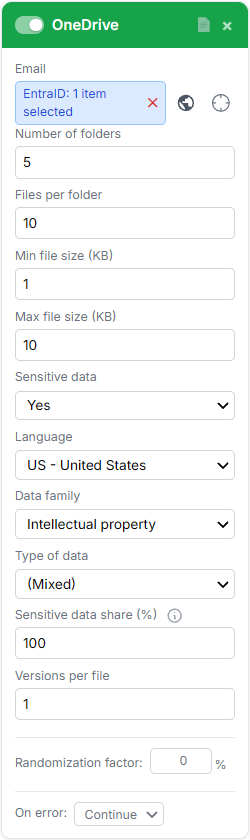
This will bring much more realistic sensitive data, many more formats and categories, and a lot more ways to put your DLP and classification policies to work!
This is how theses files looks like:
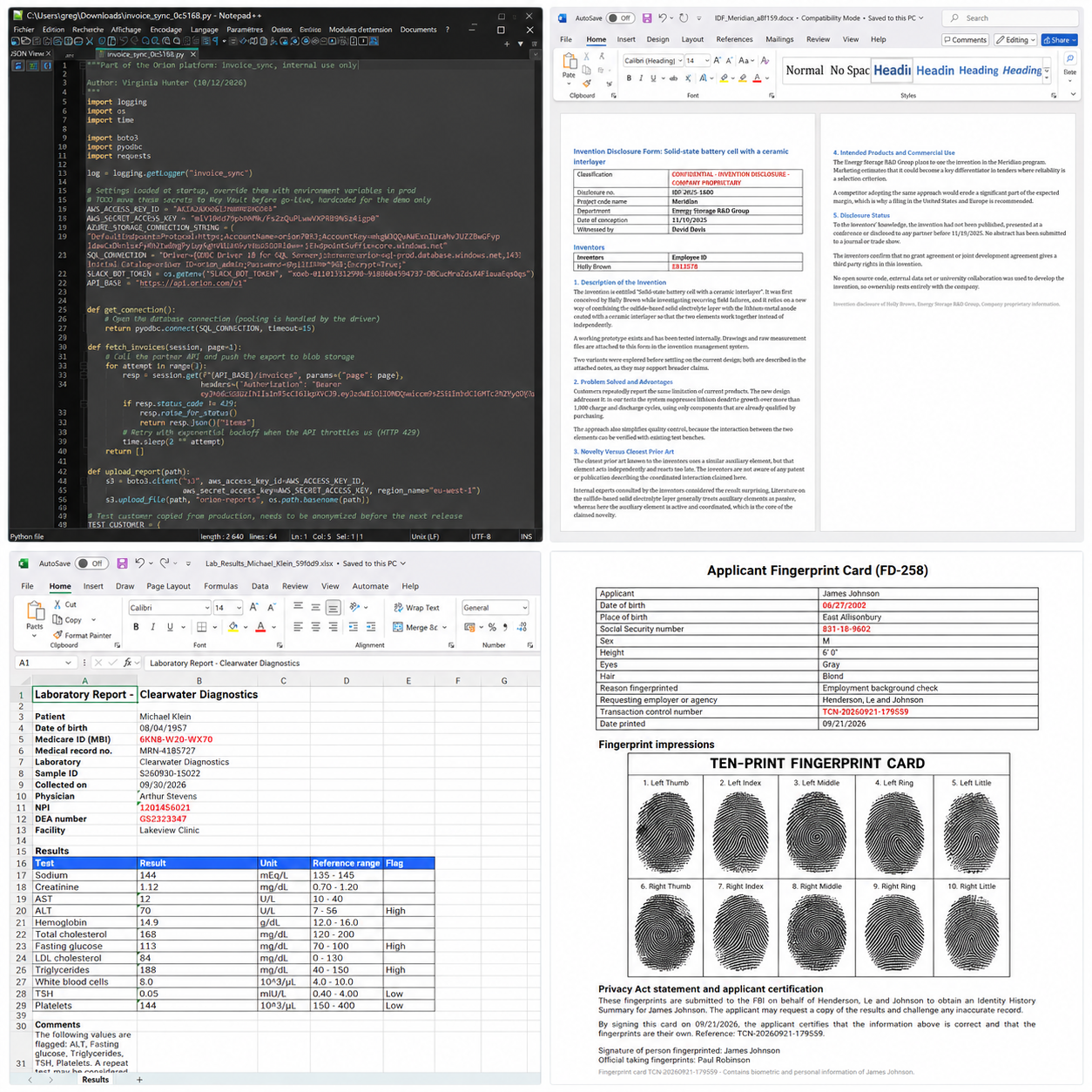
And I’ve also prepared a small ZIP with a few examples of sensitive files generated by M365Simulator, so you can see what the output actually looks like in practice.
A little preview is always better than a long explanation. 😁
4/ Throttling engine upgraded to a new progressive throttling management
Do you remember Mr Throttling from our previous article about rapid SharePoint recovery? You know, that not-so-friendly guardian standing in front of Microsoft’s API gates?
Yes, we’re going to talk about this guy again!

Microsoft sometimes tells applications: “Hey, slow down a little!”.
When too many requests are sent, Microsoft Graph can answer with an HTTP 429 or sometimes 503, together with a Retry-After value telling M365Simulator how long it should wait.
Until now, throttling could easily become a painful game of retry, fail, retry again. With the new Automatic Throttling Recovery, M365Simulator handles all of that by itself.
When Microsoft asks M365Simulator to slow down, the simulator automatically adapts depending on how serious the throttling is:
| Situation | What M365Simulator does |
|---|---|
| Small, isolated throttle | Only the affected request waits |
| Repeated throttling | Parallel activity is progressively reduced |
| Longer throttle | The affected area pauses for the requested time |
| Heavy throttling | M365Simulator pauses, sends a test request, then carefully resumes |
| Everything looks good again | Parallel activity slowly increases back to normal |
The important part is that M365Simulator does not necessarily stop the whole job.
It only slows down the area affected by Microsoft:
- For Exchange, only the affected mailbox pauses.
- For OneDrive and SharePoint, the pause applies to the tenant because Microsoft throttles those workloads more globally.
- For other workloads, only the job that triggered the throttling is slowed down.
Once Microsoft gives the green light again, M365Simulator does not immediately unleash all workers at once like nothing happened. 😅
Instead, it carefully increases parallel activity step by step.
If no new throttling happens, it eventually returns to full speed.
You’ll also see [Throttling] messages directly in the job logs, explaining what happened, how long the simulator is waiting, and when activity starts ramping up again.
You can follow exactly what’s happening through the
[Throttling] messages in the job logs. They’ll tell you why the slowdown happened, how long M365Simulator is waiting, and when it starts ramping back up.This mechanism works across the main workloads that can generate a lot of activity, no matter whether the job was launched manually, through an automation flow, a schedule, or the Public API or MCP.
Automatic throttling recovery doesn’t make Microsoft Graph faster. It makes M365Simulator smarter when Microsoft asks it to slow down, with gentler retries, cleaner recovery, fewer failed items, and hopefully fewer moments wondering why Microsoft suddenly decided your lab was having a little too much fun! 😄
5/ Updating Intune card to get full Intune RBAC management
The Intune Card also got a serious upgrade.
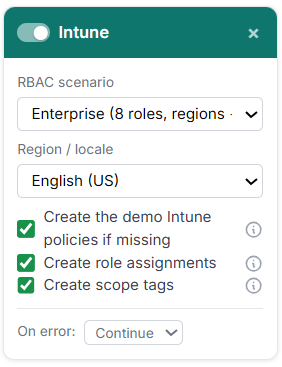
Instead of only creating a couple of demo policies, M365Simulator can now build a much more realistic Intune RBAC environment in one run, including roles, admin groups, scope groups, scope tags, assignments, and the two demo Intune policies.
The idea is simple: instead of showing Intune as one big flat admin playground, you can simulate how access would actually be delegated inside a real organization.
So the tool provides 3 ready-to-use scenarios, each designed to reflect a realistic Intune administration model you can choose from:
| Scenario | What it creates |
|---|---|
| Simple IT | 3 roles, 3 admin groups, one global scope, 3 assignments |
| Distributed IT | 5 roles split across 4 regions, with regional scope groups, scope tags, and 20 assignments |
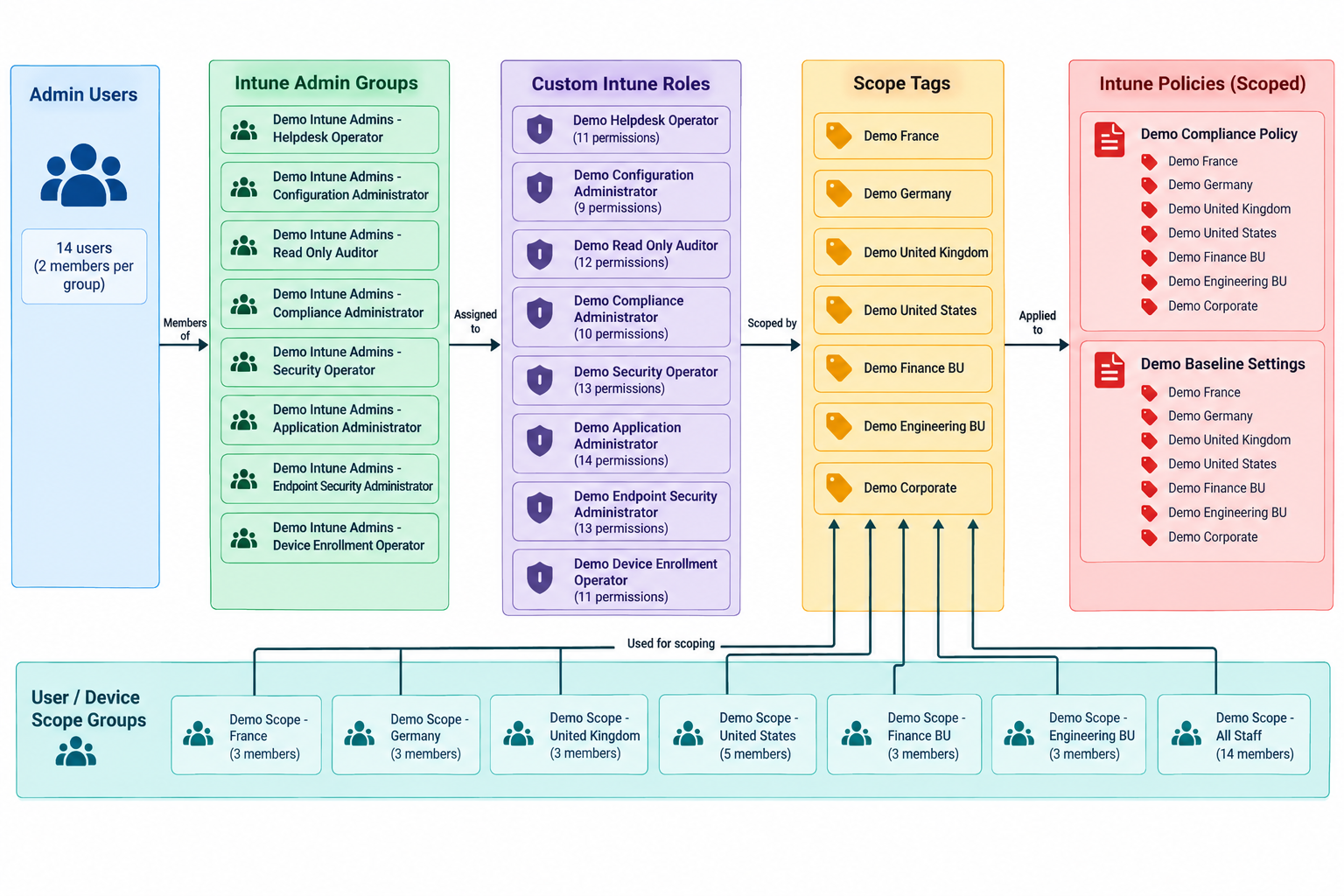
| Enterprise | 8 roles, regional and business-unit scopes, 7 scope tags, and 25 assignments with intentional overlaps |
You can simulate regional administration for France, Germany, the UK, and the US, add Finance and Engineering business units, create a global read-only auditor, and even reproduce intentional role overlaps where an administrator can manage more than one scope.
M365Simulator also uses real eligible users already present in your tenant to populate the generated groups, so the result feels much more alive than a collection of empty RBAC objects.
Role names can also be localized across several languages, while groups, assignments, and scope tags keep consistent English naming to make the environment easy to understand.
Here is a diagram showing how the Enterprise scenario is deployed and how the different Intune RBAC objects connect together:
The new Intune Card gives you a fast way to build a realistic RBAC structure, with regions, business units, delegated roles, scope tags, and assignments all created in one go.
Et voilà, my dear techies!
At this point, we can give our Microsoft 365 tenant so much activity that, in some cases, it might look busier than a real company! 😂
I hope you’ll enjoy this new v5.1 of M365Simulator!
And yes, the tool is still 100% free, with no subscription and no account creation required.
For those of you who love digging into every little detail, don’t forget that the full documentation is available here.
Happy simulating guys! 🫶