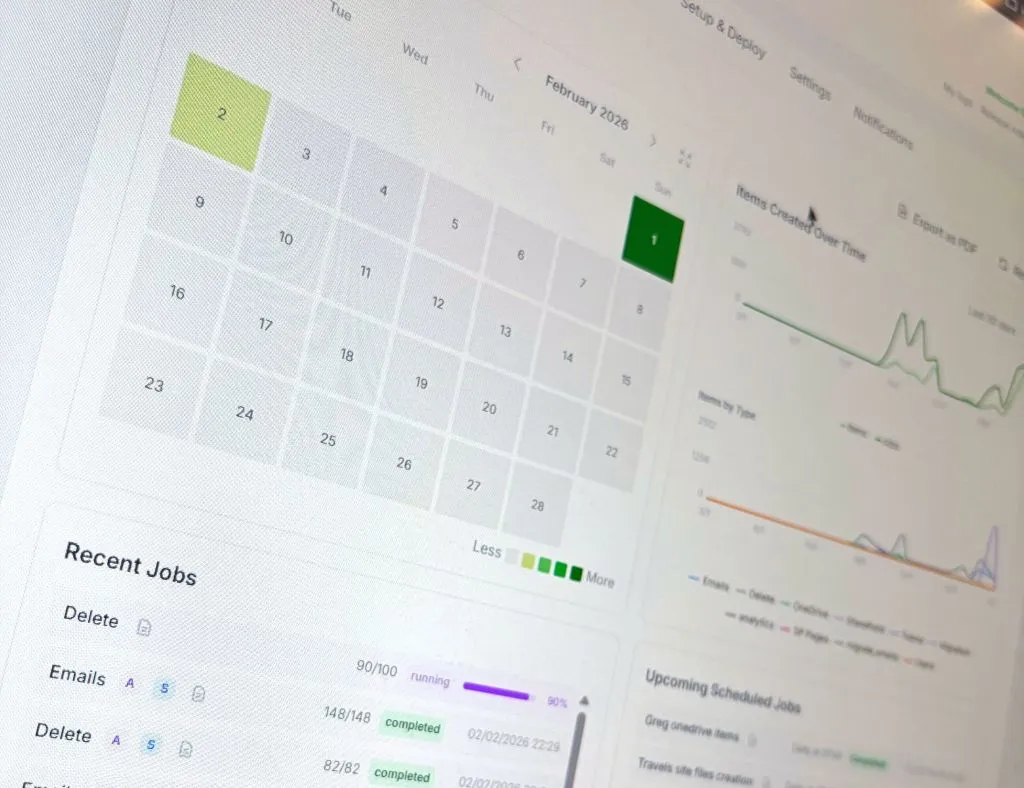


Freshly baked and ready to taste, the v4.9 is here for all you lovely tech aficionados!
Let’s see what this new recipe brings to the table.
Summary:
- New workload supported : MS Planner
- New workload supported : Outlook Calendar Events
- New workload supported : Outlook Personal Contacts
- New workload supported : SharePoint Lists
- New workload supported : Entra ID Administrative Units (Business Units)
- Update of the Deletion card to support new workloads for automated deletion
- Parallelized mutli-threads engines : Massive performance improvement
- MCP server updates
Don't forget to update your permissions in the "Setup & Deploy" tab. This is a mandatory step to make them works properly.
Now, let’s take a closer look at what all these shiny new features are really about.
1/ New workload: MS Planner
Simulating realistic MS Planner activity
Microsoft Planner is where Microsoft 365 teams turn ideas into tasks, deadlines, assignments, buckets, and progress tracking.
But in demo or lab tenants, Planner is often empty.
You may have users, Teams, SharePoint sites, mailboxes, and files… but no project activity. Not exactly the “real tenant” vibe...
That’s where the new Planner Card comes in!
It can create realistic Planner tasks inside a Microsoft 365 Group plan. Select a group, choose an existing plan or create a new one, pick a project theme, set the intensity, and let M365Simulator populate the board with meaningful tasks.
Software sprint? Marketing campaign? Cloud migration? Product launch?
Pick your flavor and the simulator creates matching buckets with:
- task titles
- assignments
- due dates
- priorities
- descriptions
- checklists,
- and even attachments files if you want!
But hey, in real life, tasks and projects keep moving because people are busy making things happen!
To make it feel even closer to reality, M365Simulator can now simulate progress over time. Tasks do not just appear and magically complete, they move step by step from not started, to in progress, to completed, just like real projects… minus the endless status meetings.
Schedule it daily and your Planner boards will keep evolving automatically, making your demo or test tenant feel alive with real activity, busy teams, and assigned tasks moving forward like everyone is actually hard at work.
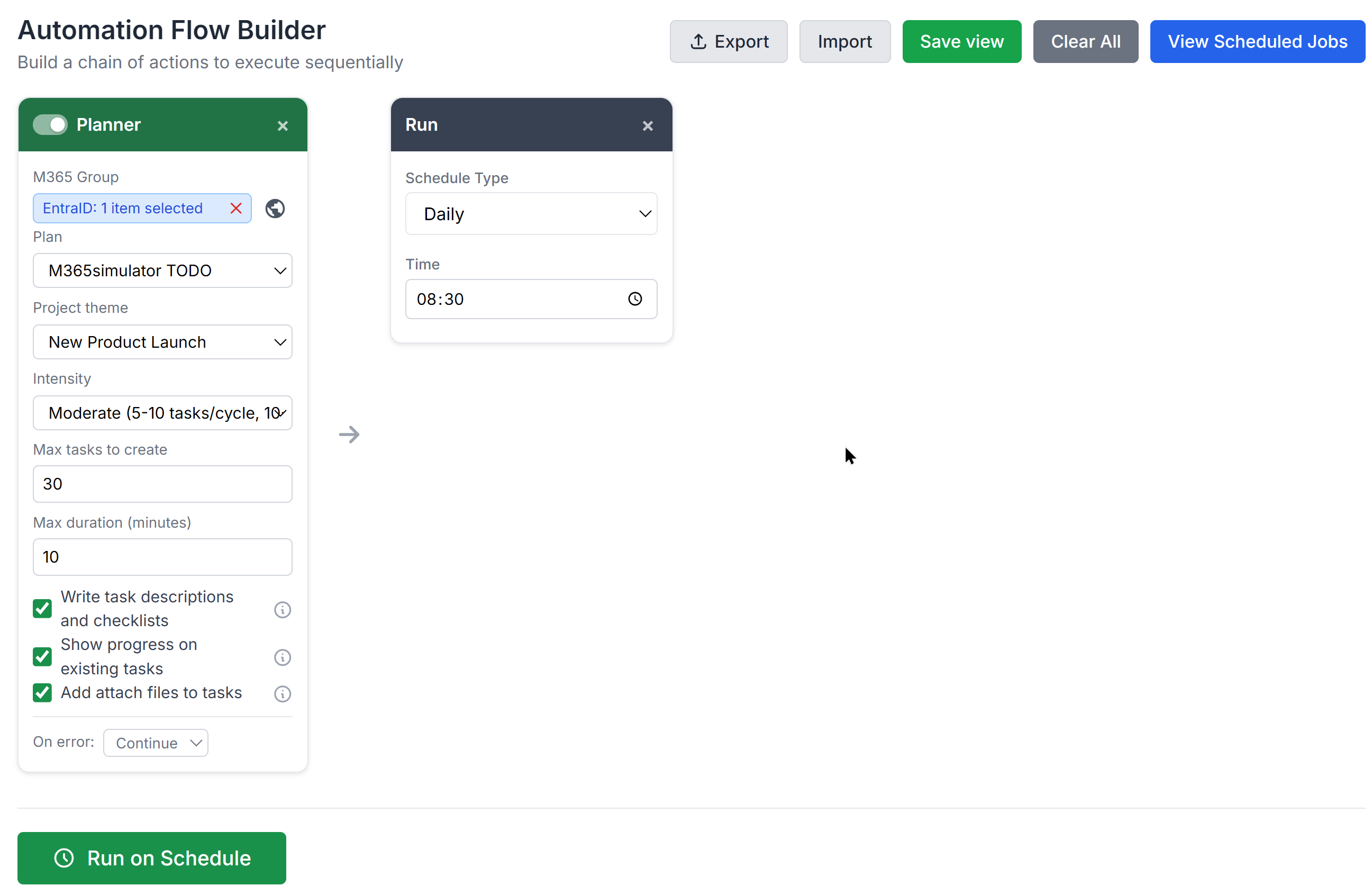
it will looks like the following in your Planner dashboard:
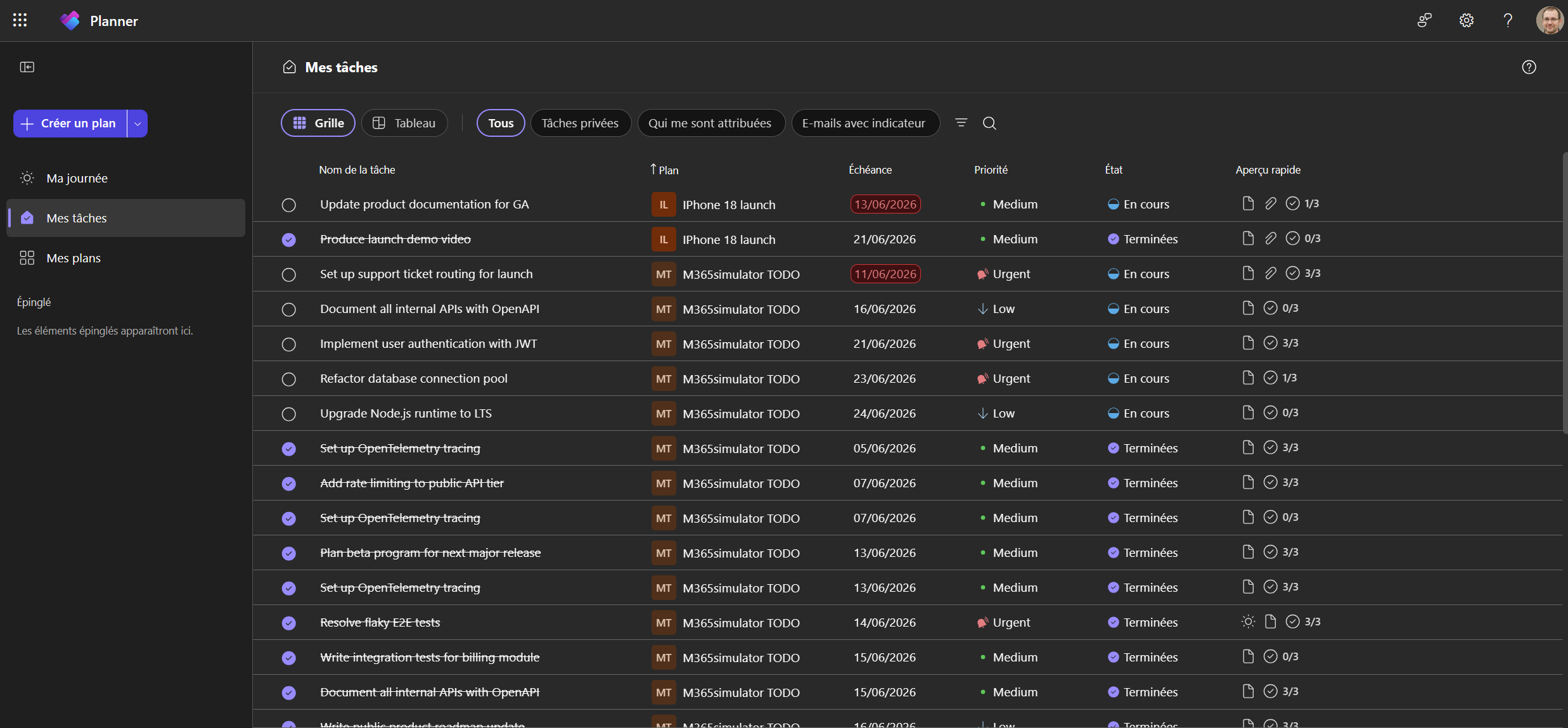
In short, the Planner card brings realistic project activity to M365Simulator, with tasks, assignments, checklists, attachments, and progress that actually tell a story.
2/ New workload: Calendar Events
Simulating realistic user's calendar activity
Typical users organize their busy workdays in Outlook: meetings, project reviews, 1:1s, customer calls, planning sessions, follow-ups, workshops… and probably a few “quick syncs” that are never quick! 😆
In real tenants, calendars are usually packed with meetings, calls, follow-ups, and mysterious “quick syncs.” But in demo lab, or test environments, mailboxes often have emails and files… and a calendar as empty as a Monday morning before coffee! Not exactly users hard at work!
So, let's put life in our Calendars!
With v4.9, you can now create realistic events and meetings directly in a user’s Exchange Online calendar. They appear in Outlook and Teams like normal calendar items, helping your test mailboxes feel much more alive.
Select a target user, choose how many events to create, define the time window, set the duration range, pick a locale, and let the simulator fill the calendar with realistic business activity.
The locale support makes the content feel more natural, with meeting titles, descriptions, and names adapted to languages and regions such as English, French, German, Spanish, Italian, Japanese, Chinese, Hebrew, and Arabic.
Generated events include realistic subjects like team syncs, project reviews, 1:1 meetings, planning sessions, and follow-up calls. They also include short descriptions, reminders, and locations, mixing meeting rooms and online meetings for a more believable agenda.
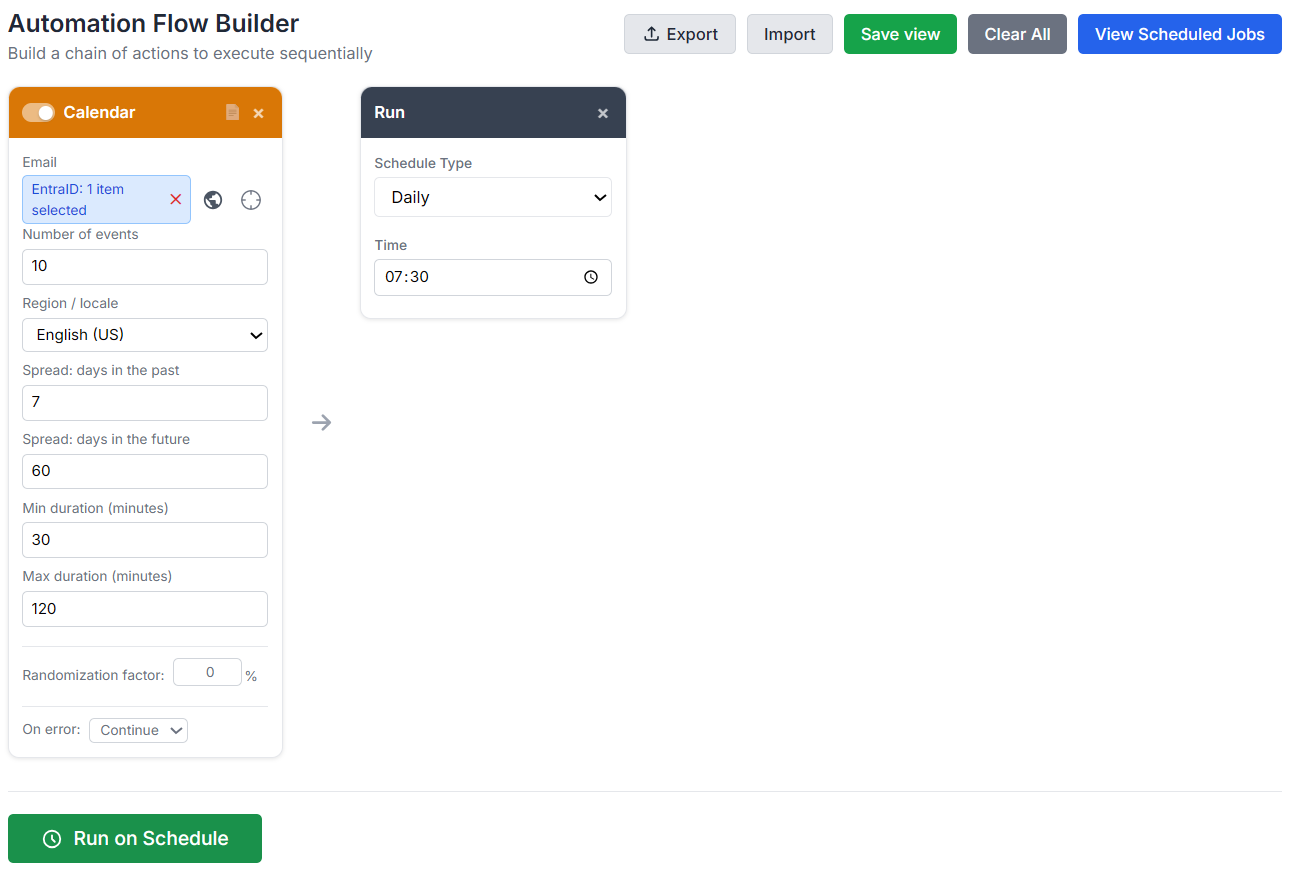
Events are randomly spread across the configured period, with a stronger focus on business hours. You can generate past activity, future meetings, or both, perfect for creating a mailbox that looks like it belongs to someone with an actual calendar life.
And no panic! The Calendar Card does not send meeting invitations. Events are created directly in the target user’s calendar, so you can populate demo users without spamming anyone. 😉
Let's have a look at my Outlook Calendar, now full of events and meetings:
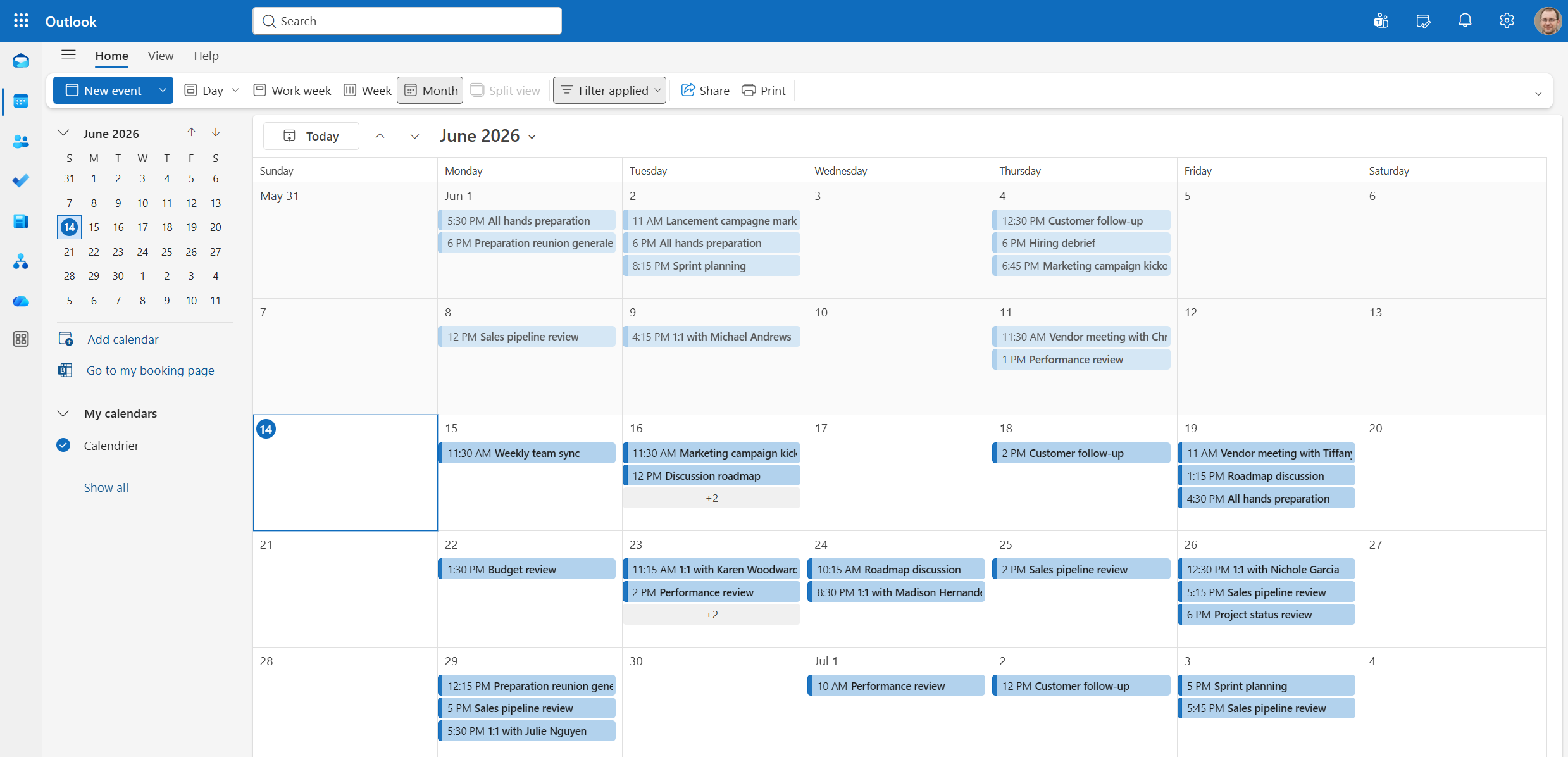
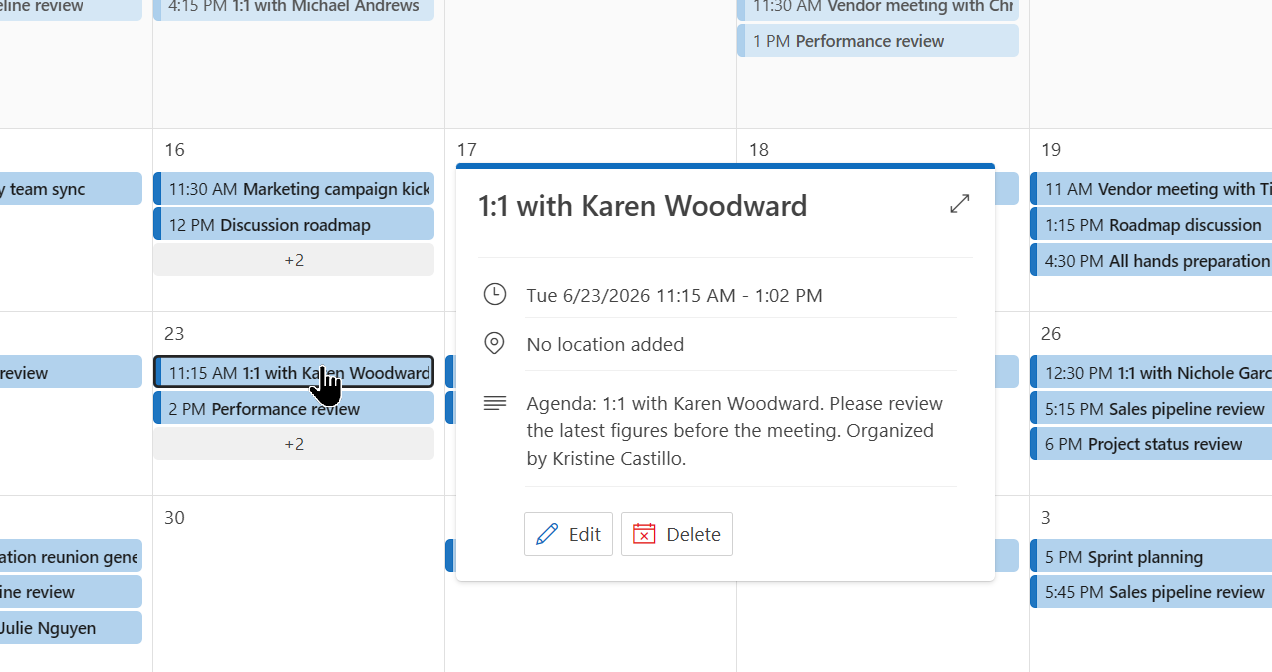
This is useful for demos, backup and restore tests, reporting, mailbox activity validation, and any scenario where an empty calendar just does not tell the right story.
The Calendar Card turns quiet mailboxes into realistic business calendars, with meetings, reminders, locations, localized content, and just the right amount of corporate scheduling chaos.
3/ New workload: Personal Contacts
Simulating realistic Outlook Contacts
A mailbox without contacts feels a bit like a phone with no friends. Emails? Check. Calendar? Check. People view? Empty. Awkward.
With the new Contacts card, M365Simulator v4.9 can now populate Outlook People with realistic personal contacts directly inside a user’s mailbox.
Pick a target user, choose how many contacts to create, select a locale, and let the simulator build a believable address book with:
- names
- job titles
- companies
- phone numbers
- cities
- and external email addresses
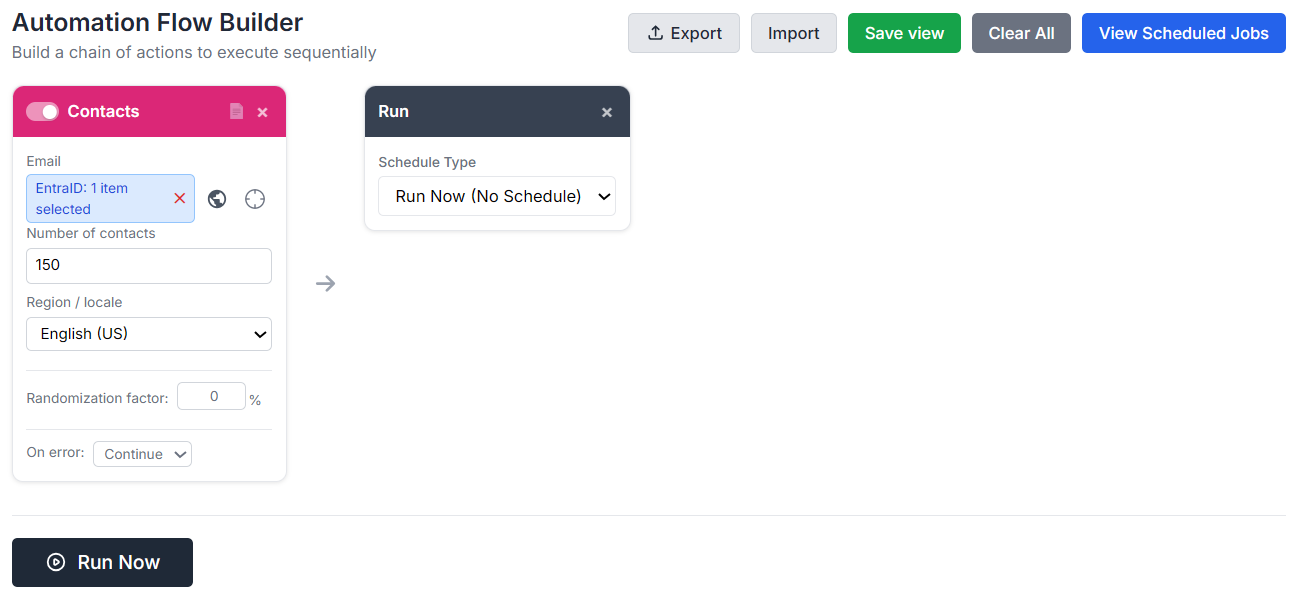
And all its generated data fully aligned with specific locales, including English, French, German, Spanish, Italian, Japanese, Chinese, Hebrew, and Arabic, because fake contacts deserve real cultural flavor too!
So French contacts look French, German contacts look German, Japanese contacts keep native-script display names, and email addresses stay clean and ASCII-safe.
Here is below how outlook contacts will look like:
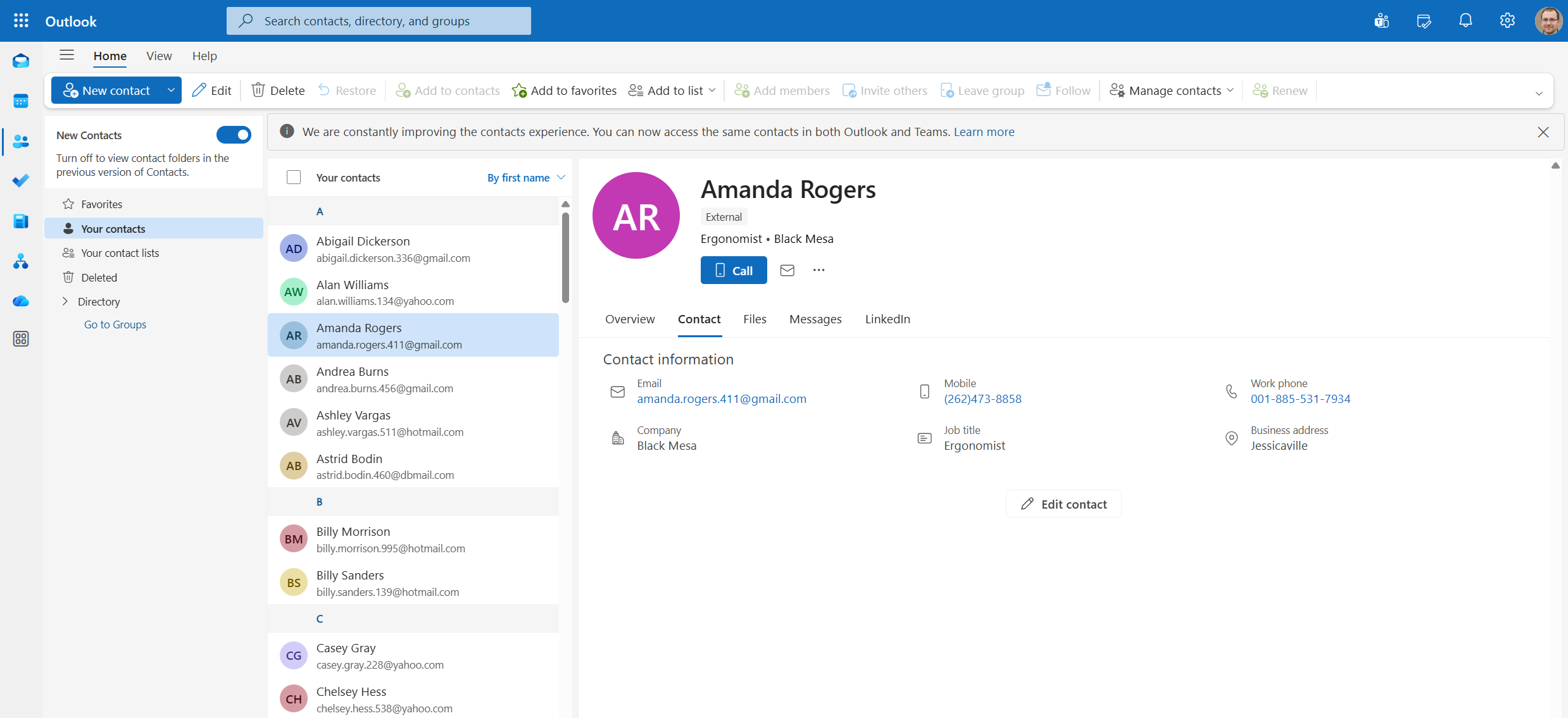
This new Contacts card in the tool will gives your Outlook mailboxes a proper social life, with realistic people, companies, phone numbers, and localized details specific to your location.
4/ New workload: SharePoint Lists
Creating realistic SharePoint Lists
A SharePoint site without lists can look a little too clean. Real organizations are usually full of structured business records: support tickets, asset inventories, onboarding trackers, risk registers, HR directories, security incidents, and all the tiny operational details that keep teams busy.
With the new SP Lists Card, M365Simulator can now generate realistic SharePoint Lists directly inside your sites.
Create a brand-new list or add items to an existing one, then choose from ready-made templates such as Support Tickets, Inventory and Assets, Risk Register, HR Directory, Onboarding Tracker, or Security Incidents.
Each template comes with its own business-ready structure.
As an example:
- Support Tickets include priorities, statuses, categories, assignees, due dates, and descriptions.
- Inventory lists include asset tags, locations, purchase dates, values, and lifecycle status.
No more sad empty lists called “Test List 1”! 😉
Generated content is also localized, the same way as the other cards are.
When possible, M365Simulator uses real tenant users for person fields such as assignee, owner, manager, or buddy.
And because business data never stays still for long, the SharePoint Lists card can also simulate progress over time.
Existing items can move through their lifecycle step by step: tickets go from New to In Progress to Resolved, assets move from In Storage to In Use or Retired, and risks slowly cool down from Critical to Low.
Schedule it regularly and your SharePoint lists keep evolving automatically, with new records being added and older ones progressing naturally through their workflows.
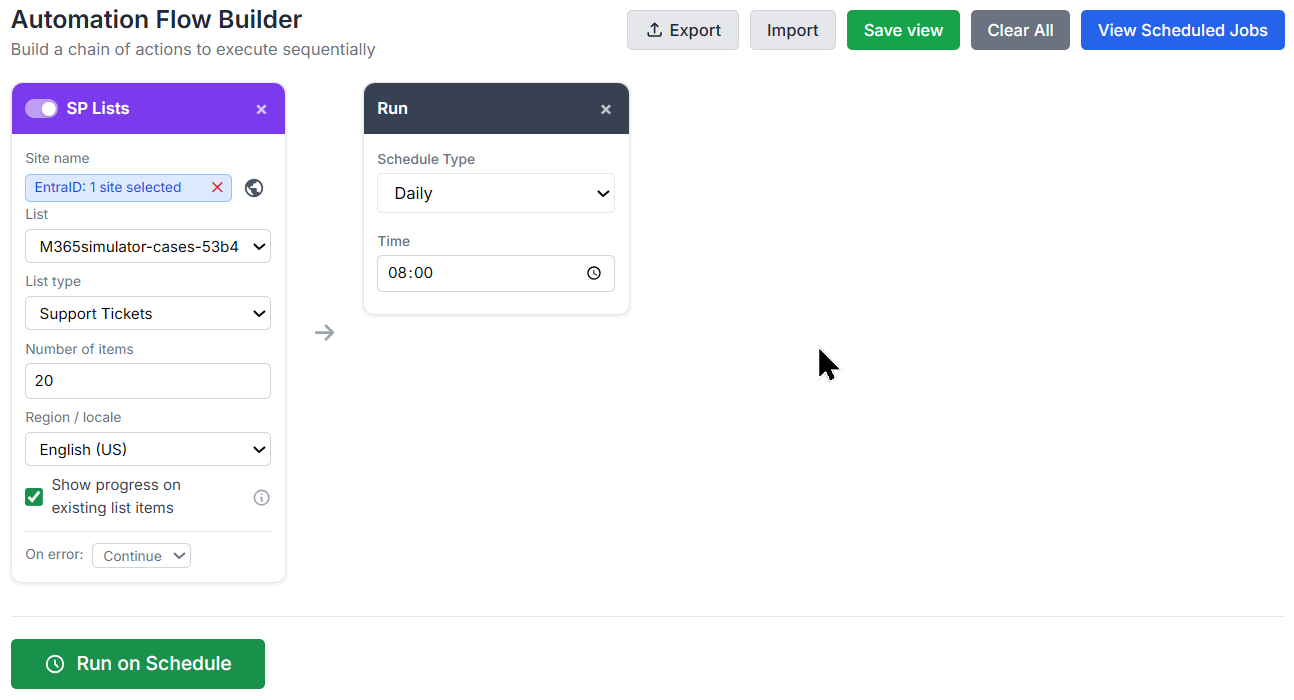
which will look like:
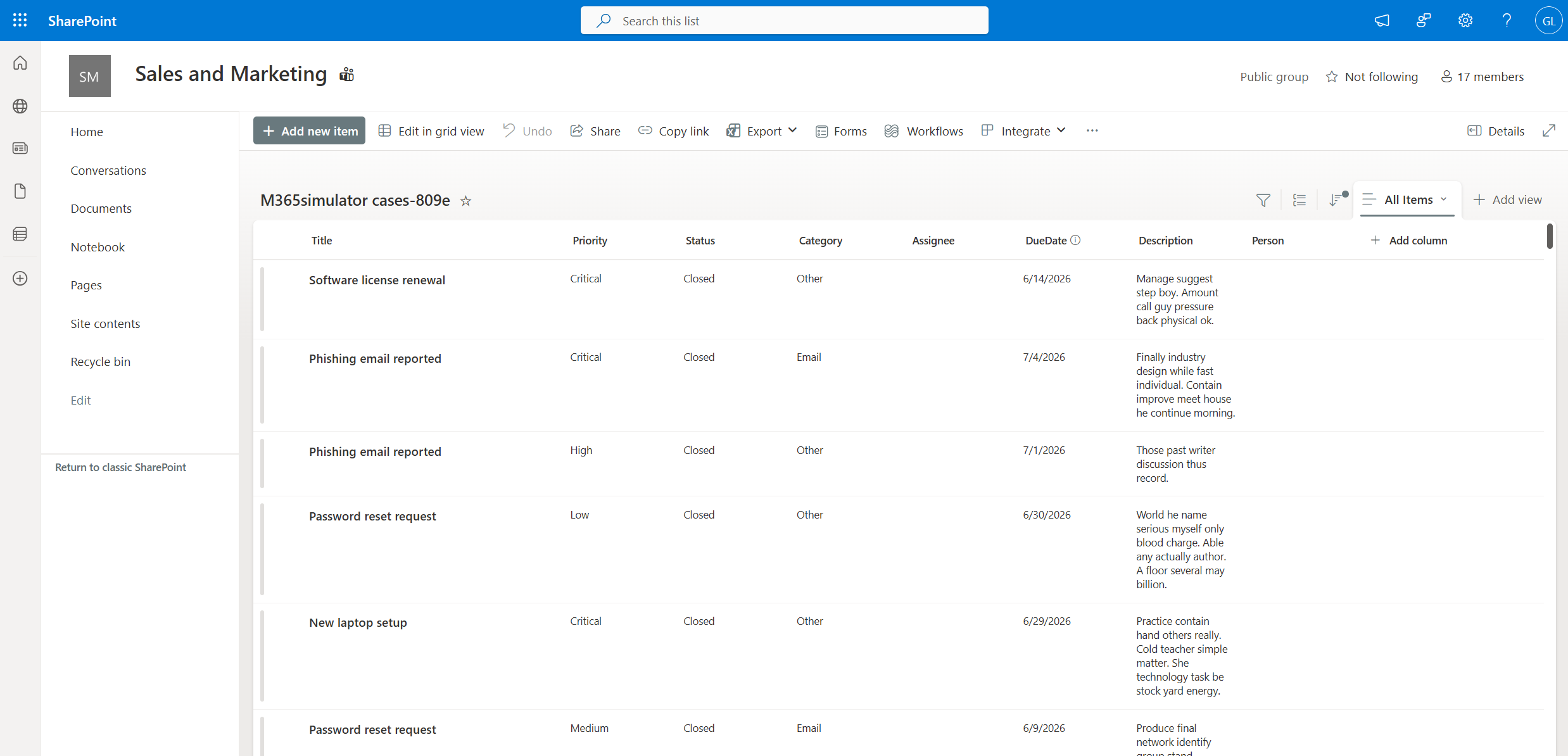
The SP Lists Card turns empty SharePoint sites into busy little business factories, packed with structured data, workflows, owners, statuses, and localized content that finally make your sites look like people actually work there.
5/ New workload: EntraID Administrative Units
Simulating Entra ID Business Units
Real enterprise tenants are almost never one big flat directory where everyone lives happily in the same bucket. They usually have regions, countries, departments, subsidiaries, offices, and business units all doing their own little corporate dance.
In Microsoft Entra ID, this kind of structure can be represented with Administrative Units. They act as containers for directory objects such as users and devices, helping model smaller management scopes inside the same tenant.
That is exactly what the new Business Unit Card brings to M365Simulator: a way to give your Entra ID lab a proper enterprise shape.
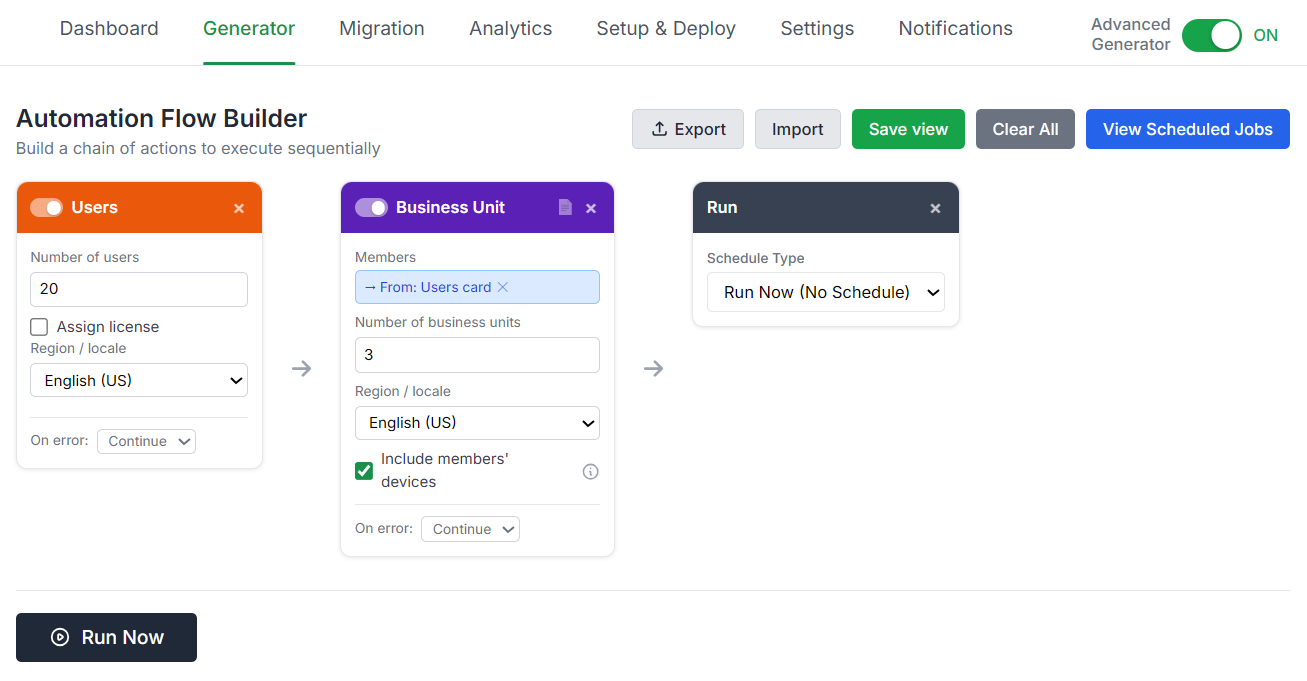
Provide a list of users or a group, choose how many business units you want, pick a locale, and let M365Simulator play enterprise architect. It creates realistic Administrative Units with localized names, then spreads users evenly across them so each unit gets its own clean set of members.
No favoritism, no tiny department with two lonely users, and no mega-unit swallowing the whole company. Users are distributed in round-robin order, and each one lands in exactly one business unit, so no evil twin secretly living in two units at once! 👹
Localized naming makes the structure feel more natural, with support for English, French, German, Spanish, Italian, Japanese, and Chinese business unit names.
Want to go one step further? Enable the option to include members’ devices, and each user’s owned Entra ID devices are added to the same unit. Identities and devices finally move together like a well-behaved enterprise family.
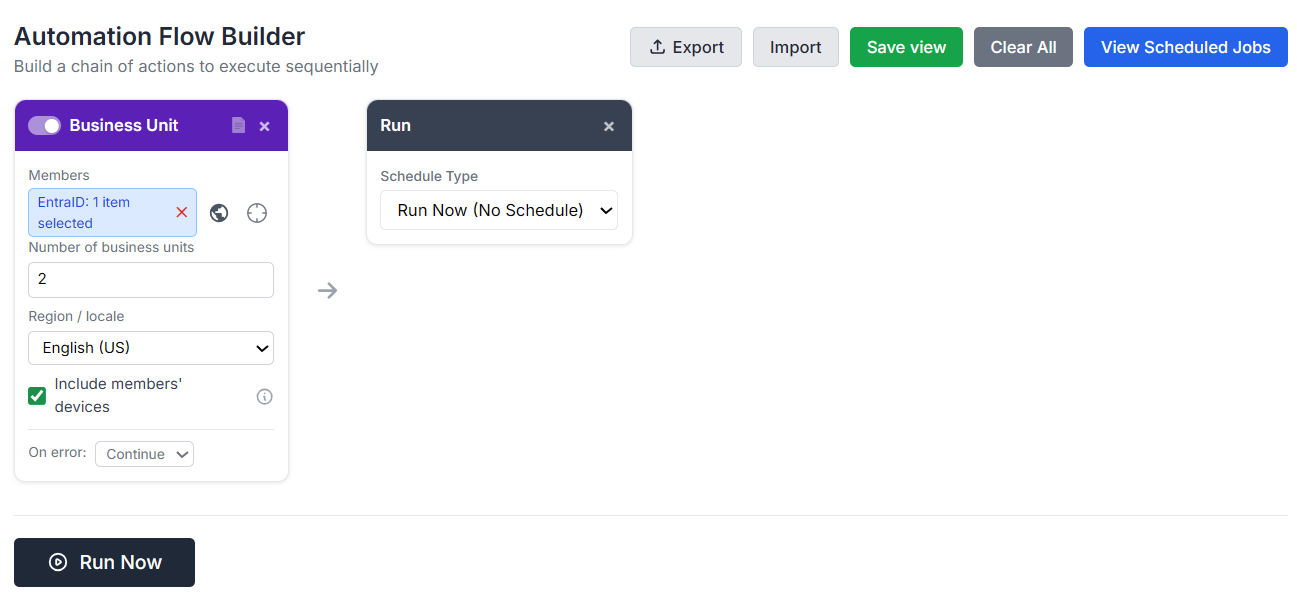
That will create:
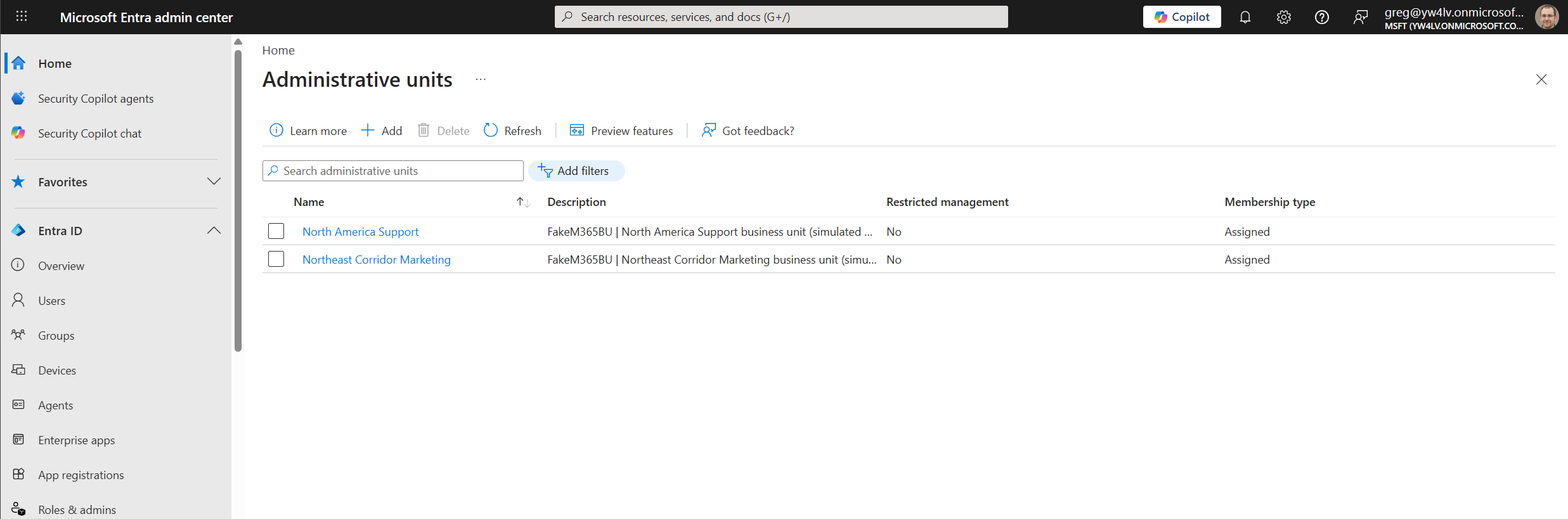
This is especially useful for demos and labs involving delegated administration, regional segmentation, tenant organization, or any scenario where a flat directory just feels too “day one tenant.”
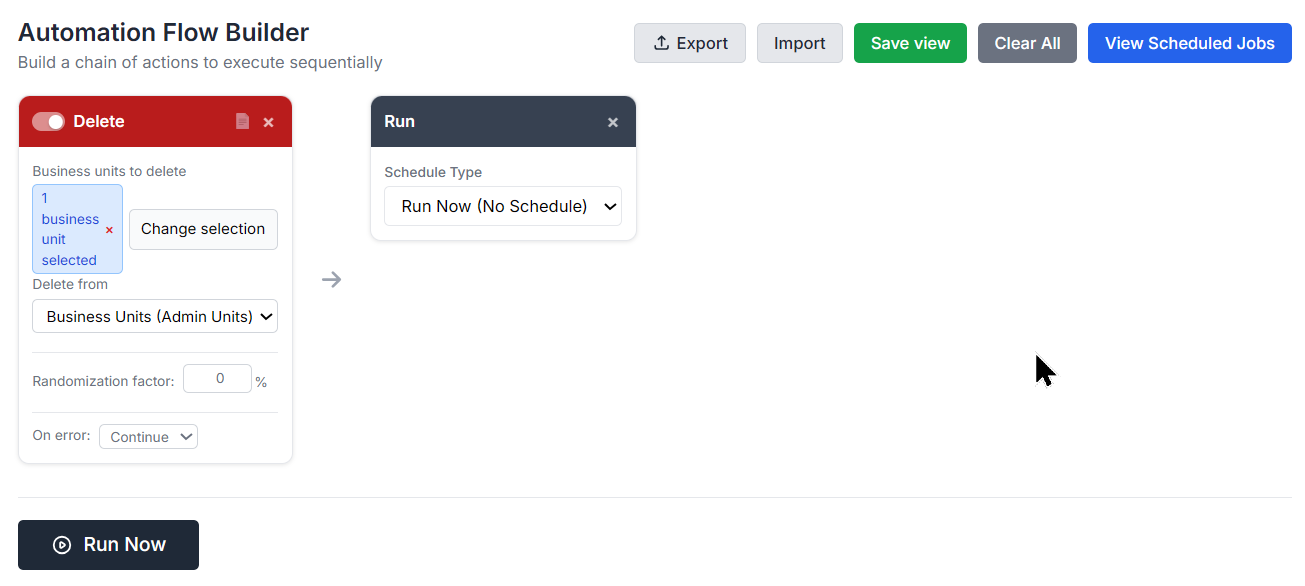
Generated business units are tagged by M365Simulator, so they can later be identified and removed cleanly through the Delete card.
To summarize, the Business Unit Card turns your Entra ID tenant from a flat crowd standing in the same room into a nicely structured organization, with localized Administrative Units, balanced user distribution, optional device membership, and cleanup support included.
Tenants demo deserve a proper org chart!
6/ Update of the Deletion card
Creating realistic data is useful.
Cleaning it up properly is just as important.
After a few simulation runs, your Microsoft 365 lab can start looking very busy. Emails everywhere, OneDrive files multiplying, calendar events stacking up, contacts filling mailboxes, and Entra ID Business Units proudly standing around like tiny departments.
At some point, even a demo tenant needs a little housekeeping.
That is where the Delete Card comes in. It gives you a controlled way to remove simulated content when you no longer need it, either manually or through a scheduled cleanup run.
The card can delete data across several workloads, including Exchange emails, OneDrive files, Outlook calendar events, personal mailbox contacts, and Administrative Units created by the Business Unit card.
You choose the target user, select the data type, define how many items to delete, and decide whether to clean up the oldest or newest items first.
You can also choose between soft delete and hard delete.
- Soft delete moves items to a recoverable location such as Deleted Items or the recycle bin.
- Hard delete removes them permanently, so use that one when you really mean goodbye.
Randomization is also supported, so cleanup jobs can vary naturally instead of deleting the exact same number every time like a robot with trust issues.
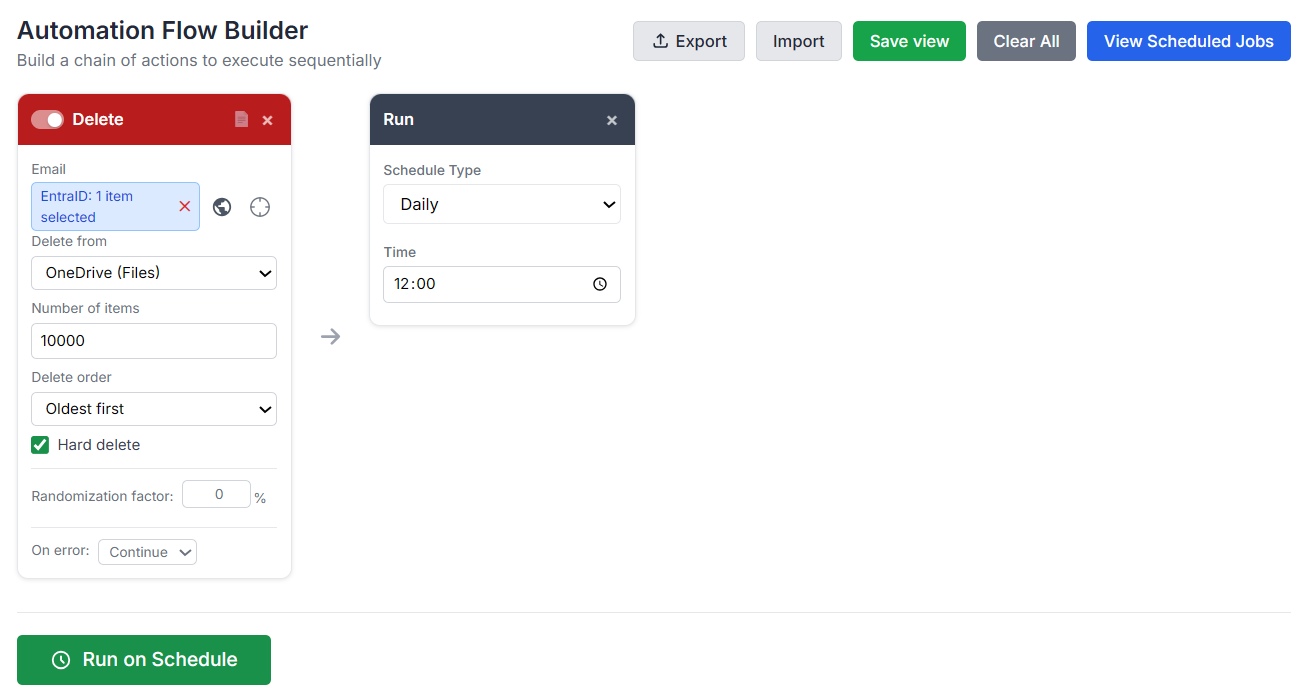
Like other M365Simulator cards, the Delete Card supports Entra ID Picker, CSV upload, and card linking. You can use it for one user or a list of users.
A simple example?
Delete the oldest 500 emails from a test mailbox after a demo, reset your lab, and pretend nothing ever happened.
7/ Massive performance improvement
Faster Bulk generation engines
Generating realistic Microsoft 365 data at scale should be fast, not feel like watching a progress bar age in real time.
Creating a few emails, files, users, calendar events, or SharePoint items is easy. But when your simulation needs thousands of objects, doing everything one by one quickly turns into the digital equivalent of walking uphill with a backpack full of logs!
That is why v4.9 now comes with a more optimized generation engine built for larger workloads.
Many generators now use controlled parallel execution, allowing multiple objects to be processed at the same time while keeping the workload stable and predictable.
Emails, files, calendar events, contacts, and cleanup operations can use worker pools where several workers run in parallel and immediately grab the next task when ready.
(Other generators use grouped or batched operations when that approach makes more sense, such as users, devices, Teams, SharePoint lists, or Business Units.)
The result is simple: bulk jobs finish faster, large simulations feel smoother, and demo tenants can be filled with realistic activity in much less time.
As an example, 25,000 emails per mailbox across 4 mailboxes completed in 50 minutes, pushing the mail generator engine to 120K emails per hour! Niiiiice! 😎

In its v4.9, M365Simulator is now faster, smarter, and more scalable, ready to generate realistic Microsoft 365 lab and demo environments without making you refill your coffee three times! ☕☕☕
8/ MCP server updates
All theses new features comes with MCP falvor as well! 🧑🍳
Good news for MCP fans: the latest goodies are not just available in the UI, they are ready to be called through MCP too!
Planner tasks, SharePoint Lists, Entra ID Business Units, Outlook personal contacts, and Outlook calendar events can now join your MCP-powered workflows.
- Generate Planner tasks with assignments, due dates, checklists, and progress that moves over time like a real project trying its best.
- Create SharePoint Lists packed with business-flavored data such as support tickets, assets, risks, onboarding items, or security incidents.
- Build Entra ID Business Units, distribute users across Administrative Units, and optionally bring their devices along for the ride.
- You can also populate Outlook with localized personal contacts and calendar events, giving mailboxes a proper social life and an actual agenda.
In short, MCP just handed a bigger toolbox, so your favorite AI minion can build richer, more realistic Microsoft 365 demo and test tenants with even more automation magic.
Here it is, dear tech friends! I hope you’ll enjoy this update as much as I enjoyed building it with love for all of you. ❤️

Fun bonus: I added a little counter in the footer showing how many files and emails have been created by the tool.
As I’m writing this, we already have generated:
1,917,592 files and 3,636,138 emails!
Not bad, my friends, not bad at all!
 M365 Data Simulator