

As an MSP, Acronis Cyber Protect Cloud can apply patch management to all devices of all your customers? that's great feature, but for now, the reboot isn't managed with the end-user consent.
That's a bit annoying... 😶
Fortunately, we’ve got another ace up our sleeve : CyberScripting !
It’s a fantastic feature that’s going to make things a whole lot easier.
Let's build a PowerShell script, managed by Acronis CyberScripting, to check if a reboot is needed and then ask to the user to acknowledge the reboot or postpone ? 💡
Even better, it could shoot an email to the admin when the device reboots.
And since execution is handled by CyberScripting, it seamlessly integrates into a protection plan that admins can easily manage. Easy peasy!
Ok fellows, let do the job !
First, let's get a high view of the process flow diagram :
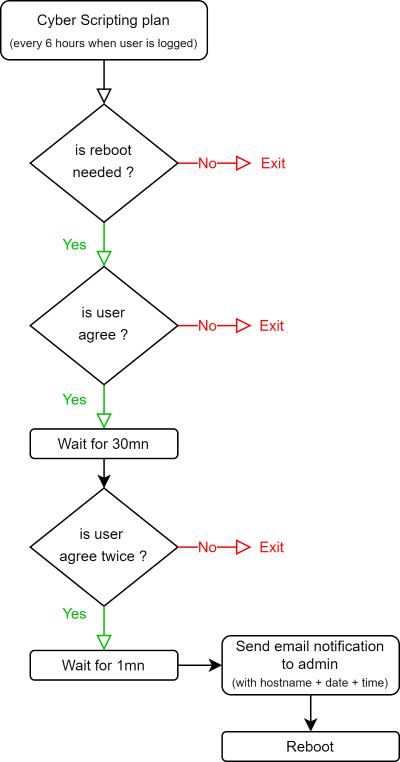
- Fire-up PowerShell and let's start by checking for several registry record to check if a reboot is needed :
Add-Type -AssemblyName System.Windows.Forms

# is reboot is pending ?
function Check-RebootPending {
    $keys = @(
        "HKLM:\SOFTWARE\Microsoft\Windows\CurrentVersion\WindowsUpdate\Auto Update\RebootRequired",
        "HKLM:\SOFTWARE\Microsoft\Windows\CurrentVersion\Component Based Servicing\RebootPending",
        "HKLM:\SOFTWARE\Microsoft\Windows\CurrentVersion\Component Based Servicing\RebootInProgress",
        "HKLM:\SOFTWARE\Microsoft\Windows\CurrentVersion\Component Based Servicing\PackagesPending"
    )

    foreach ($key in $keys) {
        if (Test-Path $key) {
            return $true
        }
    }
    return $false
}

# should we continue ?
if (-not (Check-RebootPending)) {
    Write-Host "No pending reboot. Exiting script."
    exit
}
if yes, shoot a pop-up message to user's session about request to restart the device :
# First Popup
$result = [System.Windows.Forms.MessageBox]::Show("Hello, a reboot is pending on your device for patch update`nWe will reboot it in 30mn, does it suit you?", "Alert", [System.Windows.Forms.MessageBoxButtons]::OKCancel)
if ($result -eq [System.Windows.Forms.DialogResult]::OK) {
    # Wait for 30mn
    Start-Sleep -Seconds 1800
then, if user approved, remind him 1mn before the reboot :
# Second Popup
    $result2 = [System.Windows.Forms.MessageBox]::Show("Reboot will start in 1mn, does it suit you?", "Alert", [System.Windows.Forms.MessageBoxButtons]::OKCancel)
    if ($result2 -eq [System.Windows.Forms.DialogResult]::OK) {
        # If 'OK' clicked, wait for 1mn
        Start-Sleep -Seconds 60
Before restarting we need to send an email to the admins.
Let build the email function we gonna use :
function Send-EmailNotification {
    $hostname = [System.Net.Dns]::GetHostName()
    $smtpClient = New-Object Net.Mail.SmtpClient("my.smtp.server", 587)
    $smtpClient.EnableSsl = $true
    $smtpClient.Credentials = New-Object Net.NetworkCredential("sender@email.adresse", "Your_P@ssw0rd")

    $fromAddress = New-Object Net.Mail.MailAddress("sender@email.adresse", "Reboot Notification Service")
    $mailMessage = New-Object Net.Mail.MailMessage
    $mailMessage.From = $fromAddress
    $mailMessage.To.Add("admin-team@msp.fr")
    $mailMessage.Subject = "Redémarrage du device - $hostname"
    $mailMessage.Body = "Hostname: $hostname`r`nDate and Time: $(Get-Date -Format 'yyyy-MM-dd HH:mm:ss')"

    $smtpClient.Send($mailMessage)
}
So, the user has approved, we send the mail and reboot the device :
# Send an email
Send-EmailNotification

# Force reboot the computer
Restart-Computer -Force
and finally, here is the full script :
Add-Type -AssemblyName System.Windows.Forms

# is reboot is pending ?
function Check-RebootPending {
    $keys = @(
        "HKLM:\SOFTWARE\Microsoft\Windows\CurrentVersion\WindowsUpdate\Auto Update\RebootRequired",
        "HKLM:\SOFTWARE\Microsoft\Windows\CurrentVersion\Component Based Servicing\RebootPending",
        "HKLM:\SOFTWARE\Microsoft\Windows\CurrentVersion\Component Based Servicing\RebootInProgress",
        "HKLM:\SOFTWARE\Microsoft\Windows\CurrentVersion\Component Based Servicing\PackagesPending"
    )

    foreach ($key in $keys) {
        if (Test-Path $key) {
            return $true
        }
    }
    return $false
}

# should we continue ?
if (-not (Check-RebootPending)) {
    Write-Host "No pending reboot. Exiting script."
    exit
}

# send mail
function Send-EmailNotification {
    $hostname = [System.Net.Dns]::GetHostName()
    $smtpClient = New-Object Net.Mail.SmtpClient("my.smtp.adresse", 587)
    $smtpClient.EnableSsl = $true
    $smtpClient.Credentials = New-Object Net.NetworkCredential("sender@mail.net", "Your_P@ssw0rd")

    $fromAddress = New-Object Net.Mail.MailAddress("sender@mail.net", "Reboot Notification Service")
    $mailMessage = New-Object Net.Mail.MailMessage
    $mailMessage.From = $fromAddress
    $mailMessage.To.Add("admins-team@mail.fr")
    $mailMessage.Subject = "Redémarrage du device - $hostname"
    $mailMessage.Body = "Hostname: $hostname`r`nDate and Time: $(Get-Date -Format 'yyyy-MM-dd HH:mm:ss')"

    $smtpClient.Send($mailMessage)
}

# First Popup
$result = [System.Windows.Forms.MessageBox]::Show("Hello, a reboot is pending on your device for patch update`nWe will reboot it in 30mn, does it suit you?", "Alert", [System.Windows.Forms.MessageBoxButtons]::OKCancel)
if ($result -eq [System.Windows.Forms.DialogResult]::OK) {
    # Wait for 30 mn
    Start-Sleep -Seconds 1800

    # Second Popup
    $result2 = [System.Windows.Forms.MessageBox]::Show("Reboot will start in 1mn, does it suit you?", "Alert", [System.Windows.Forms.MessageBoxButtons]::OKCancel)
    if ($result2 -eq [System.Windows.Forms.DialogResult]::OK) {
        # If 'OK' clicked, wait for 1 mn
        Start-Sleep -Seconds 60

        # Send an email
        Send-EmailNotification

        # Force reboot the computer
        Restart-Computer -Force
    }
    elseif ($result2 -eq [System.Windows.Forms.DialogResult]::Cancel) {
        # If 'Cancel' clicked, exit the script
        exit
    }
}
elseif ($result -eq [System.Windows.Forms.DialogResult]::Cancel) {
    # Exit the script if 'Cancel' is clicked in the first popup
    exit
}- Now, let automate the process thru CyberScripting plans
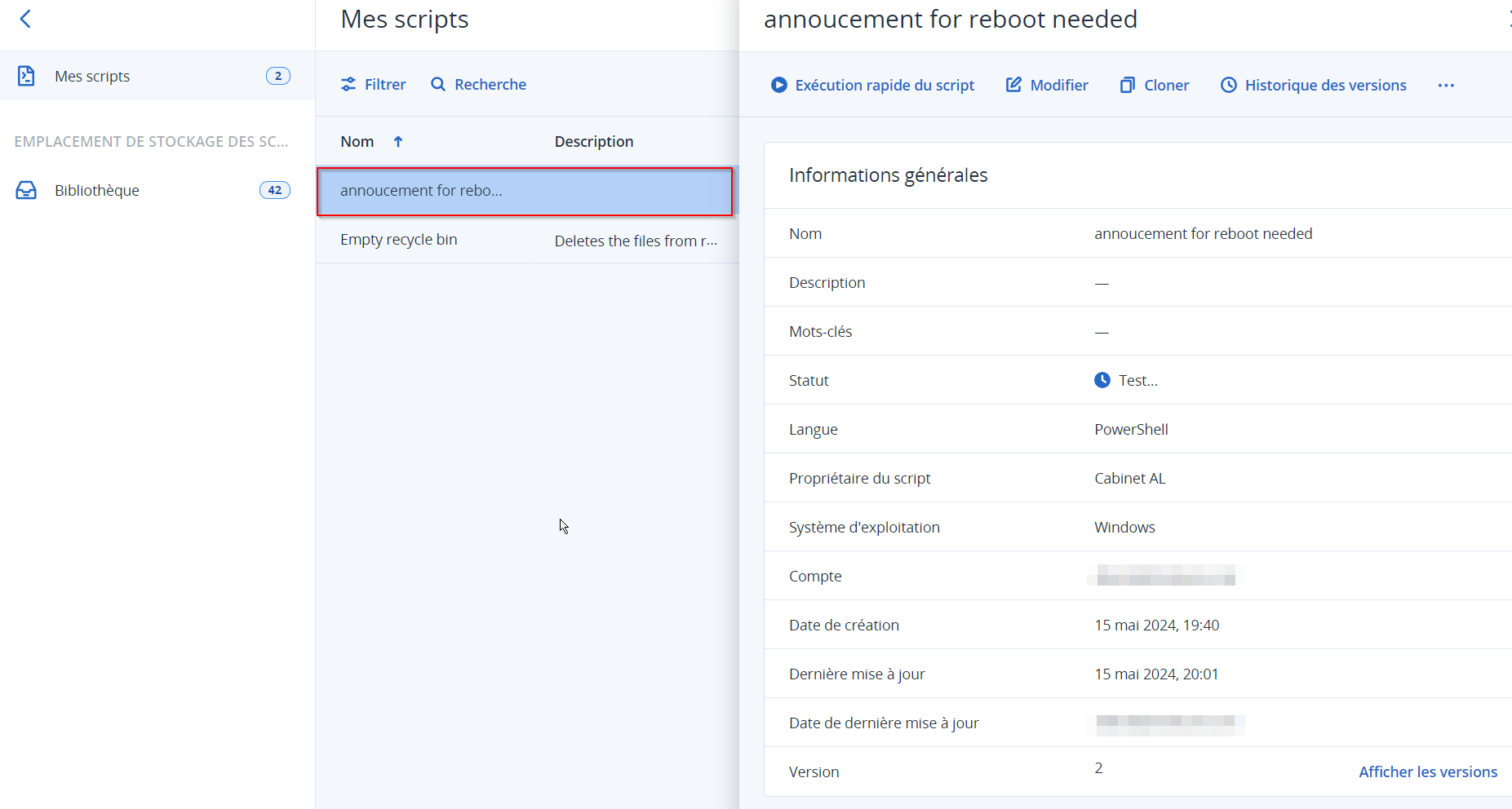
First, let's add the script in the Acronis script repository
Then create a scripting plan.
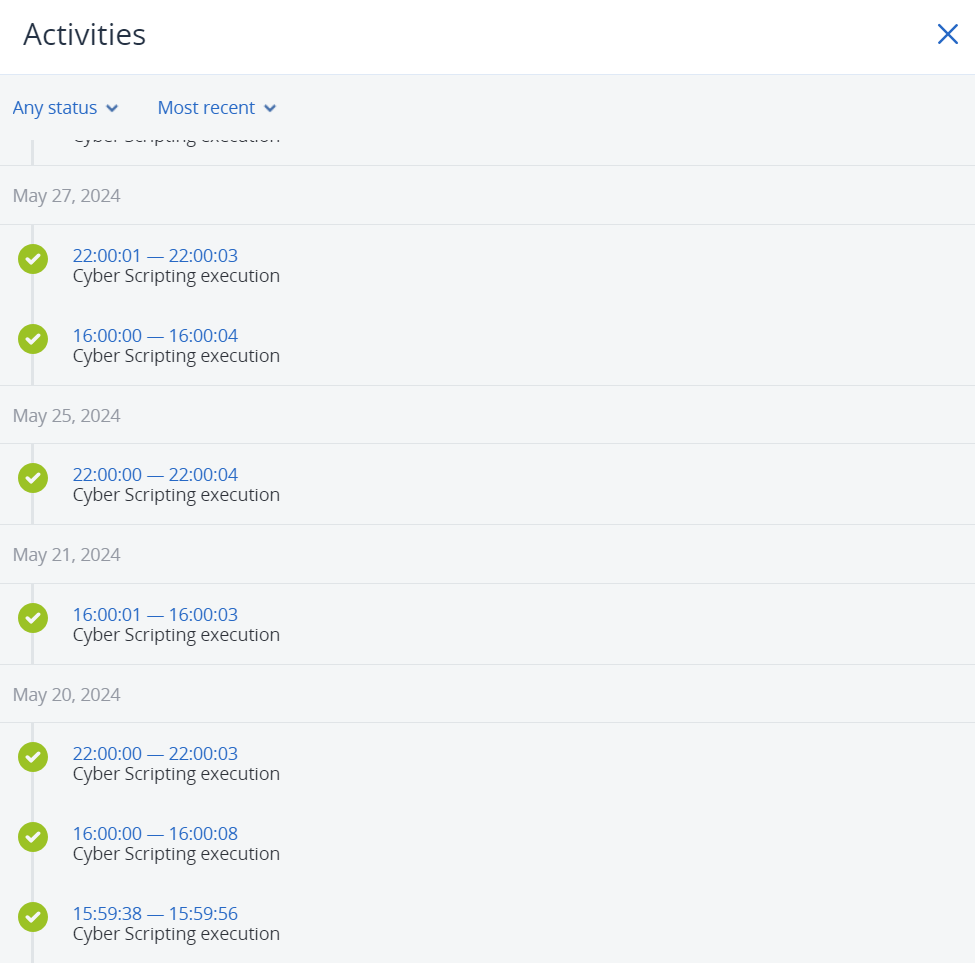
The scripting plan will run every 6 hours during working hours under the currently logged-in user’s account, making sure any reboot requests are timely and relevant.
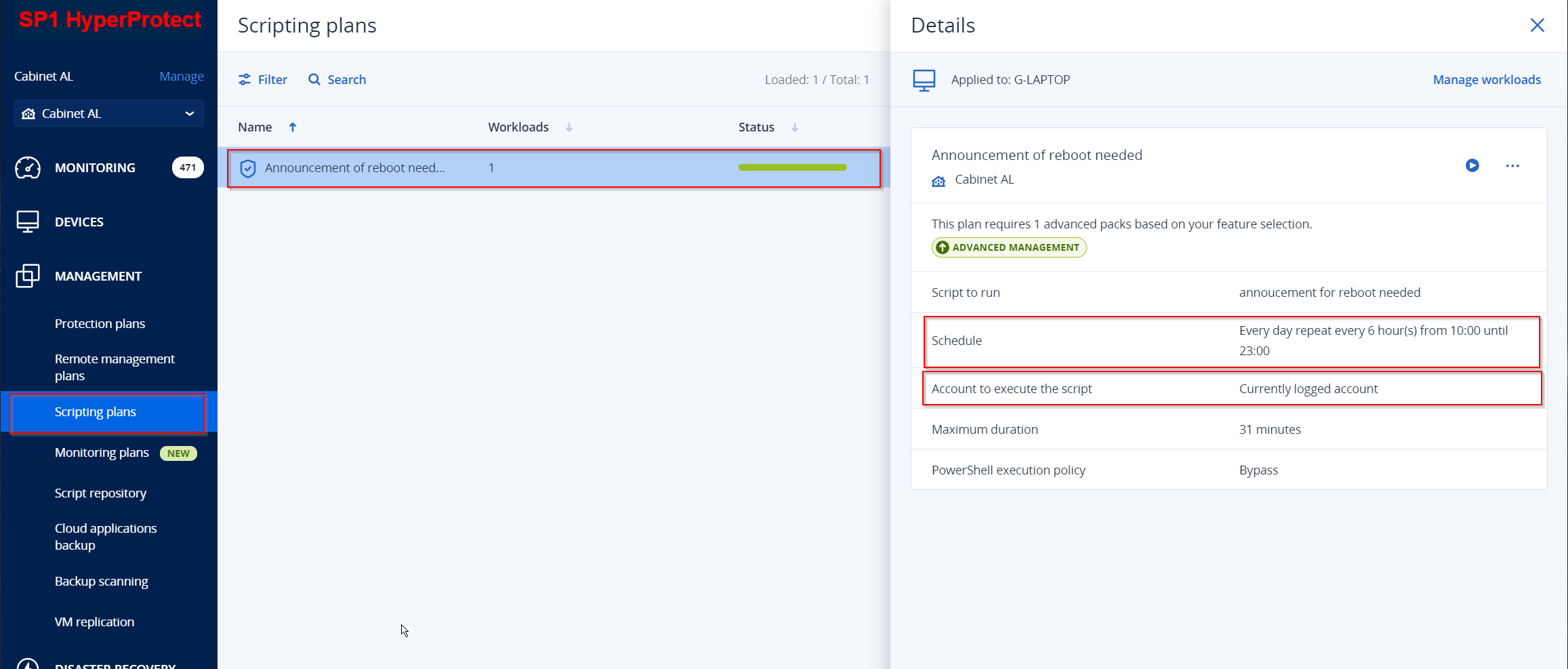
Here’s the deal: The script will run every 6 hours on the user’s device, and only ask for a reboot if one’s pending.
Admins get the heads-up when the reboot happens, complete with the device name, date, and time.
Pretty handy, right?
I like my reboot concierge ! 😄